Introduction
Picture this: it's four days before your organization's grant reporting deadline, and ransomware has locked every staff member out of the donor database. The files are encrypted. The attacker wants payment. And your "backup" turns out to be a USB drive no one has touched in eight months.
This scenario plays out more often than most nonprofit and small business leaders realize. Ransomware appeared in 88% of breaches involving small organizations in Verizon's 2025 Data Breach Investigations Report — and the mean recovery cost reached $1.53 million in Sophos's 2025 research, excluding any ransom payment.
This guide covers what you actually need to know:
- The difference between backup and disaster recovery
- How RTO and RPO metrics shape your strategy
- The backup types that fit lean IT environments
- A five-step process for building a recovery plan
- Best practices built for organizations with 10–150 staff
Start with the fundamentals, and you'll have a clear picture of what your organization actually needs before spending a dollar on tools.
Key Takeaways
- BDR = backup + disaster recovery — two distinct but interdependent processes that must work together
- RTO and RPO are the two core metrics to define before choosing any BDR solution
- The 3-2-1 rule — three copies, two media types, one offsite — is the proven baseline standard
- Recovery drills matter as much as the backups themselves — untested systems are not the same as preparedness
- Nonprofits face compounded risk — constituent data sensitivity, compliance obligations, and lean IT staff all demand a structured BDR approach
What Is Backup and Disaster Recovery?
These two terms get used interchangeably, but they describe different things.
Data backup is the process of creating and storing copies of critical files, databases, and systems in a secure, separate location — on physical media, a local server, or in the cloud — so data can be restored after accidental deletion, corruption, or attack.
Disaster recovery (DR) is broader: a documented set of policies, procedures, and tools designed to restore entire IT systems and operations after a major disruption. It goes beyond individual files to include applications, network configurations, and the continuity of critical workflows.
Why Both Are Required
Backups alone do not guarantee business continuity. A recovery plan without reliable backups is equally ineffective. The two must work together:
- Backups provide the data needed to restore systems
- The DR plan defines how that data is used, in what order, and within what timeframe
- Together, they determine whether your organization gets back online in four hours or four days
An organization with excellent backups but no recovery plan will still struggle when disaster strikes. Having copies of your data is not the same as knowing how to restore operations under pressure.
Disaster Recovery as a Service (DRaaS)
For organizations without dedicated IT staff, DRaaS offers a managed alternative. A third-party provider hosts the recovery infrastructure and manages the recovery process during a crisis — making enterprise-grade protection accessible without large capital investment.
ETTE offers cloud-based backup and disaster recovery services as part of its managed IT portfolio, including DRaaS capabilities and Azure-backed recovery options for nonprofit and small business clients in Washington, DC.
RTO and RPO: The Metrics That Define Your Recovery Strategy
Before selecting any backup tool or DR approach, two questions need answers: How fast must we recover? and How much data can we afford to lose? Those questions have formal names.
Recovery Time Objective (RTO)
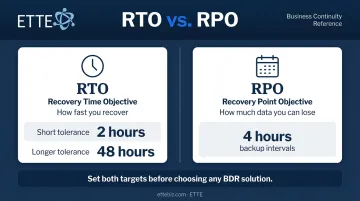
RTO is the maximum amount of time your organization can tolerate being offline after a disruption before the impact becomes unacceptable.
RTO varies significantly by context. A nonprofit managing live event registrations may need systems restored within two hours. An organization running an offline archive might tolerate 24–48 hours of downtime. Neither answer is wrong — but both need to be defined before a crisis, not during one.
Recovery Point Objective (RPO)
RPO is the maximum amount of data loss your organization can afford, measured in time since the last backup.
Plain-language example: an RPO of four hours means your backups run every four hours. If a disaster hits at 3:45 PM and your last backup ran at noon, you lose nearly four hours of work. Whether that's acceptable depends entirely on your operations.
RTO vs. RPO at a Glance
| Metric | What It Measures | What It Informs |
|---|---|---|
| RTO | How fast you recover (time to restore systems) | Your DR strategy and infrastructure |
| RPO | How much data you can afford to lose (backup frequency) | Your backup schedule and storage approach |
Setting Realistic Targets
Knowing what the metrics mean is only half the work. The harder part is setting targets that reflect your actual operations. NIST SP 800-34 is direct on this: base your RTO and RPO on a business impact analysis, not on industry averages or vendor defaults. The process looks like this:
- List your most critical systems (membership database, accounting software, email, program files)
- Categorize each by operational impact if unavailable
- Assign recovery tiers — Tier 1 systems get aggressive RTO/RPO targets; Tier 3 systems can tolerate more downtime
- Document those targets as measurable benchmarks your BDR plan must meet
For most nonprofits and small businesses, this exercise surfaces a clear pattern: two or three systems are genuinely mission-critical, and the rest can wait. Tiering your recovery targets around that reality keeps costs manageable without leaving your most important operations exposed.
Types of Data Backups: Choosing the Right Approach
The Three Core Backup Types
| Type | What It Does | Trade-off |
|---|---|---|
| Full backup | Complete copy of all data | Most comprehensive; most storage-intensive |
| Incremental backup | Only data changed since the last backup | Saves space and time; recovery requires chaining prior backups |
| Differential backup | Data changed since the last full backup | Middle ground — faster recovery than incremental, less storage than full |
Additional Options Worth Knowing
- Cloud backup — offsite, scalable, accessible remotely; protects against local disasters
- Hybrid backup — combines local and cloud storage for both speed and geographic resilience
- Continuous data protection (CDP) — replicates changes in near real-time; appropriate when even minutes of data loss are unacceptable
What Works for Nonprofits and Small Businesses
For nonprofits and small businesses with limited budgets, most organizations do well with:
- Daily incremental backups to catch recent changes
- Weekly or monthly full backups as the baseline
- Storage in two locations — local for fast recovery, cloud for disaster resilience
Most ransomware attacks and hardware failures are recoverable within hours using this setup — no enterprise infrastructure required.
What Counts as a Disaster? Common Scenarios to Plan For
The word "disaster" conjures floods and fires. In practice, the triggers that actually disrupt small organizations are more mundane — and more frequent.
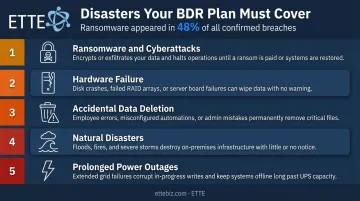
Scenarios Your BDR Plan Must Address
- Ransomware and cyberattacks — increasingly targeting smaller organizations with limited defenses; per Verizon's 2026 DBIR, ransomware appeared in 48% of all confirmed breaches
- Hardware failure — a server or hard drive crash can take down operations without warning
- Accidental data deletion — a staff member permanently deletes the wrong folder; it happens regularly
- Natural disasters — flooding, severe weather, or building damage affecting on-site systems
- Prolonged power outages — on-site systems go down; cloud-only data may remain accessible but workflows break
The "Too Small to Be Targeted" Fallacy
Every scenario in that list applies to small organizations — yet many still assume they're low-priority targets. Human error and phishing emails that slip through are the most common data loss triggers for smaller organizations, and attackers pursue them because defenses tend to be thinner, not in spite of their size.
A formal BDR plan is the baseline protection that keeps a staff error or a piece of malware from shutting down operations entirely. It's not an IT budget luxury — it's operational continuity.
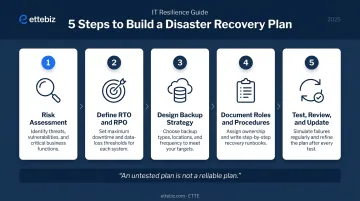
How to Build a Disaster Recovery Plan: 5 Steps
Step 1: Risk Assessment
Start by identifying the specific threats your organization faces: cyber attacks, physical risks to your facility, and human error patterns. Then conduct a business impact analysis to determine which systems and data are most critical to operations.
"Recovery" means something different for every organization. For a nonprofit, that might mean restoring the donor database before anything else.
Step 2: Define RTO and RPO Targets
Using your assessment findings, assign specific recovery time and data loss tolerances to each critical system. Document these as measurable benchmarks: not aspirations, but firm commitments your BDR infrastructure must meet.
Step 3: Design Your Backup and Recovery Strategy
Select backup types, storage locations (on-premises, cloud, hybrid), and replication methods that align with your RTO/RPO targets and budget. Two priorities:
- Automate wherever possible (manual backup processes fail silently)
- Apply the 3-2-1 rule (three copies, two media types, one offsite)
Step 4: Document Roles, Procedures, and Communication Plans
Write out exactly who does what when a disaster occurs:
- Who declares the incident?
- Who initiates the recovery process?
- Who communicates with the board, donors, or clients and in what order?
- What are the escalation paths if primary contacts are unavailable?
NIST SP 800-34 and NIST CSF 2.0 provide solid starting frameworks for this documentation, particularly around plan development and recovery communications.
Step 5: Test, Review, and Update Regularly
A plan that has never been tested is not a reliable plan. NIST guidance recommends testing contingency plans at least annually and after significant changes to systems or operations.
Testing should include:
- Full recovery drills (at minimum once per year, ideally twice)
- Backup restore validation — confirm that files can actually be retrieved
- Plan review after staff changes, system migrations, or operational shifts
For organizations without a dedicated internal IT team, keeping this plan current is often where things slip. ETTE's managed IT services address this directly through quarterly service reviews that cover backup status, technology lifecycle, and operational recommendations — keeping BDR plans accurate as systems and staff change.
BDR Best Practices for Nonprofits and Small Organizations
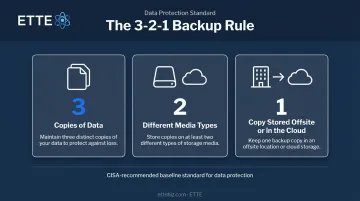
Apply the 3-2-1 Backup Rule
CISA formally recommends the 3-2-1 rule as a baseline standard:
- 3 copies of critical data
- 2 different types of media (for example, local drive and cloud storage)
- 1 copy stored offsite or in the cloud
Each element covers a different failure scenario — offsite storage handles local disasters, media diversity guards against format-specific failures, and the redundancy across all three accounts for the combinations that real incidents tend to produce.
Encrypt Backups and Protect the Repository
Backups are only as secure as the environment they're stored in. Veeam's 2025 research found that 89% of ransomware victims had backup repositories targeted, with an average 34% of repositories modified or deleted. Attackers know that destroying backups eliminates the recovery option.
Practical protections include:
- Encrypted storage for all backup data, at rest and in transit
- Role-based access controls — not everyone needs write access to backup systems
- Immutable backup formats — write-once storage that cannot be modified or deleted during a set retention period, which removes the ransomware's ability to corrupt the recovery copy
Understand Your Compliance Obligations
Strong backup security is a prerequisite for compliance — but it doesn't replace it. Requirements vary by organization type, data handled, and jurisdiction. Relevant considerations for Washington, DC nonprofits include:
- HIPAA — covered entities and business associates must maintain retrievable exact copies of electronic protected health information; HIPAA documentation must be retained for six years from creation or last effective date
- DC's Consumer Security Breach Notification law — requires reasonable safeguards for computerized personal information
- Grant compliance — federal grants under 2 CFR Part 200 may impose data retention requirements that affect backup schedules and storage duration
Compliance gaps can result in fines or loss of funding. Working with an IT partner who understands these obligations — and can produce auditable evidence of backup testing and policy reviews — reduces exposure on both fronts.
Frequently Asked Questions
What is the difference between backup and disaster recovery?
Backup is the process of copying and storing data for safekeeping. Disaster recovery is the broader plan and set of procedures for restoring entire systems and operations after a major disruption. Both are essential: backups supply the data, and the DR plan defines how to use it to get back online.
What are the 5 steps of disaster recovery?
The five core steps are:
- Conduct a risk assessment
- Define RTO and RPO targets
- Design a backup and recovery strategy
- Document roles and procedures
- Test and update the plan regularly
Each step depends on the ones before it — skipping any one weakens the whole.
What are RTO and RPO examples?
An RTO of four hours means systems must be restored within four hours of a disruption. An RPO of one hour means backups run hourly, so the maximum data loss would be 60 minutes of activity. Both targets vary by organization and by the criticality of each system.
What is the 3-2-1 rule for backing up?
Keep three copies of data, stored on two different types of media, with one copy located offsite or in the cloud. This minimum standard protects against local hardware failure, format-specific corruption, and physical disasters at your site.
How often should you test your disaster recovery plan?
At minimum, one to two full recovery tests per year, plus more frequent component tests such as verifying backup restores. Any significant change to systems, staff, or operations should also trigger a plan review, not just the annual calendar date.
What types of disasters should a BDR plan cover?
Plans should address cyberattacks (especially ransomware), hardware failures, accidental data deletion, natural disasters, and prolonged power outages. For most small organizations, human error and cyberattacks are the most common triggers, not dramatic physical events.