Introduction
Picture this: your organization just discovered that three staff members have been using a donor management system that's no longer supported—no security patches, no vendor updates, no compliance coverage. Or your finance director opens next year's budget and realizes IT costs are impossible to predict because no one tracked when software contracts renew.
These situations aren't unusual. According to the 2024 Nonprofit Digital Investments Report by NTEN, 24% of nonprofits don't include technology in their strategic plans at all, and another 33% include it only as a vague, general topic. Without a forward-looking plan, technology decisions happen reactively—triggered by failures, surprise costs, or compliance pressure.
An IT roadmap changes that dynamic. It's a structured, visual plan that connects technology decisions to organizational goals, builds budget predictability, and eliminates reactive decision-making.
This guide explains what an IT roadmap is, what it should contain, how to build one, and how to know when your organization needs one.
Key Takeaways
- Aligns technology investments with organizational goals over a 1–3 year horizon
- Serves as a leadership tool, not a day-to-day support queue
- Covers goals, timelines, budgets, dependencies, risks, and KPIs
- Builds budget predictability and reduces reactive IT decisions
- Requires quarterly reviews to stay accurate and actionable
What Is an IT Roadmap?
An IT roadmap is a forward-looking, strategic blueprint that outlines an organization's planned technology initiatives, investments, and changes over a defined period—typically one to three years—aligned to business goals.
Unlike a ticket queue or maintenance schedule, it's an executive-level planning tool that answers a different set of questions:
- What technology decisions are coming in the next 12–24 months?
- Which investments are tied to specific organizational priorities?
- What will IT cost, broken out by quarter?
- What risks or compliance deadlines need to be planned for now?
Because it's an internal-facing document, an IT roadmap focuses on the systems, infrastructure, and processes that keep your organization running—not products or services delivered to customers.
IT Roadmap vs. IT Strategy vs. IT Budget
These three concepts are related but serve distinct purposes:
| Term | Defines | Time Horizon |
|---|---|---|
| IT Strategy | Why technology investments are made—the long-term vision | 3–5 years |
| IT Roadmap | What will happen and when—specific initiatives and timelines | 1–3 years |
| IT Budget | How much will be spent—line-item financial planning | Annual or multi-year |
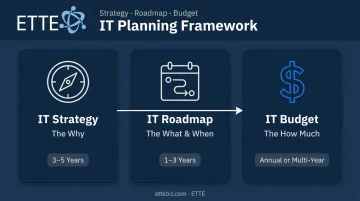
The roadmap is the operational bridge between strategy and budget. For nonprofits and small businesses especially, that bridge matters: technology decisions made without one tend to be reactive, unbudgeted, and disconnected from what the organization is actually trying to accomplish.
Key Components of an IT Roadmap
A well-constructed IT roadmap isn't just a list of upcoming projects. It has six core components that give leadership the visibility and control they need to make confident decisions.
Goals and Objectives
Every initiative in the roadmap should connect to a specific organizational priority. Strong roadmaps use SMART goals—specific, measurable, achievable, relevant, time-bound—so that every technology investment has a justifiable purpose.
Examples for nonprofits and small businesses:
- Improve donor data security by implementing multi-factor authentication across all systems by Q2
- Enable hybrid work by standardizing remote access controls for all staff by end of fiscal year
- Replace an aging donor management system with a supported cloud-based platform within 18 months
Timelines and Milestones
A visual timeline—typically broken into quarters or fiscal years—shows when initiatives begin, when they end, and what marks meaningful progress. Common milestones include:
- A system migration completing on schedule
- A new software platform going live for staff
- A compliance audit passed or security control implemented
- A vendor contract renewed or sunset on plan
Resource Requirements and Budget
This component itemizes estimated costs for each initiative, including:
- One-time purchases (hardware, implementation fees)
- Recurring costs (SaaS subscriptions, licensing renewals)
- Staff time or vendor service costs
The goal is a clear view of IT spending across the planning horizon—not a reactive scramble at budget season.
Dependencies and Risks
Some projects can't start until others finish. This component maps those dependencies and flags known risks with mitigation strategies. Common risk categories include:
- End-of-life software or hardware requiring replacement
- Vendor lock-in or contract renewal pressure
- Compliance deadlines tied to data handling or security requirements
- Documentation gaps that create continuity vulnerabilities
Performance Metrics (KPIs)
Each initiative needs defined success criteria, or there's no way to know whether the investment paid off. Typical KPIs include:
- Reduction in help desk tickets or system downtime
- Improved staff productivity after a platform migration
- Compliance controls met by a target deadline
- Security posture score improved quarter over quarter
Defined KPIs also give leadership something concrete to report to boards or funders—not just "we upgraded our systems," but measurable outcomes tied to organizational goals.
Types of IT Roadmaps
Not every organization needs the same type of roadmap. The three most common types are:
- Enterprise IT Roadmap — A broad, org-wide view of all technology initiatives over 12–18 months. This is the most common format for leadership reporting and board communication.
- IT Project Roadmap — Focused on a single initiative or a cluster of related projects, such as a cloud migration or a CRM replacement.
- IT Architecture Roadmap — Tracks how underlying infrastructure and systems evolve over time, often used when redesigning a technical foundation. It often follows structured frameworks like TOGAF's Architecture Development Method across business, information systems, and technology architecture phases.
For most nonprofits and small organizations with 10–150 staff, the most practical choice is a combined enterprise IT roadmap with a multi-year budget breakdown by quarter. It should cover hardware refreshes, software renewals, security upgrades, and compliance planning — all in one leadership-ready document.
Why Nonprofits and Small Organizations Need an IT Roadmap
Budget Predictability
Technology costs are unpredictable for organizations without a roadmap. A server fails unexpectedly. A software contract renews at a higher rate. A compliance requirement surfaces two months before a grant audit.
A roadmap spreads visibility over a 2–3 year horizon, broken by quarter. That means leadership can plan annual budgets with confidence, avoid cash flow disruptions, and present technology needs transparently to boards or funders. NTEN's 2024 data shows that 77% of nonprofits cite available budget as a barrier to digital investment—but much of that friction stems from unpredictability, not actual scarcity.
Strategic Alignment
Without a roadmap, IT spending tends to drift. Tools get purchased for one department without considering organization-wide impact. Security upgrades get deferred because there's no visible deadline. Donor management systems age out without a replacement plan.
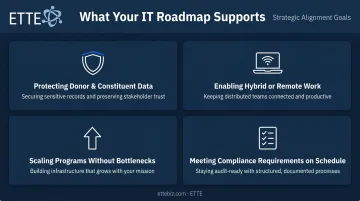
With a roadmap, every technology investment connects directly to a defined goal:
- Protecting donor and constituent data
- Enabling hybrid or remote work
- Scaling programs without operational bottlenecks
- Meeting compliance requirements on schedule
Risk and Compliance Management
For organizations handling sensitive data—donor records, employee information, financial data, or health-adjacent data—surfacing risks early is the difference between a manageable project and a crisis. According to IBM's 2023 Cost of a Data Breach Report, organizations with fewer than 500 employees experienced an average data breach cost of $3.31 million—up 13.4% from the prior year.
A roadmap catches compliance deadlines, end-of-life systems, and security gaps early enough to address them on your terms, not in response to an incident.
Cost Savings Through Visibility
Those risks carry a direct cost—and so does unmanaged software sprawl. Capterra's research on SMB software management found that 36% of software in small-to-midsize retail businesses was redundant or unused, with only 28% formally canceling applications they no longer needed. Similar findings held in HR: 50% of HR software tools had overlapping functions.
A roadmap—built on a thorough IT assessment—helps organizations identify redundant tools, overlapping vendor contracts, and underutilized subscriptions. Consolidating those costs creates budget room for higher-priority investments.
How to Build an IT Roadmap: A Step-by-Step Approach
Step 1 – Assess Your Current IT Environment
Start with a full inventory of existing hardware, software, subscriptions, and infrastructure. This "as-is" assessment reveals:
- What's working and what's aging out
- What's redundant or underutilized
- Where gaps exist relative to organizational goals
- What documentation is missing or outdated
Common discoveries in organizations without a prior roadmap: former employees with active accounts, critical files stored in personal drives, shared logins across departments, and cloud platforms that were never properly configured after migration.
Step 2 – Define Business Goals and Align IT Priorities
Leadership—Executive Director, Operations Director, or board—should identify the top organizational priorities for the next 1–3 years. Then translate those into specific IT requirements.
Useful alignment questions include:
- Are we spending the right amount on IT?
- Are we secure enough to protect donor and employee data?
- What do we need to replace or upgrade in the next 24 months?
- Who owns our technology roadmap, and are they accountable?
This step ensures the roadmap reflects mission priorities, not just IT department preferences.
Step 3 – Identify and Prioritize Initiatives
Evaluate proposed initiatives against four criteria:
- Impact — Does this advance a key organizational goal?
- Effort — What resources does it require?
- Dependencies — What must happen first?
- Risk — What happens if this is delayed?
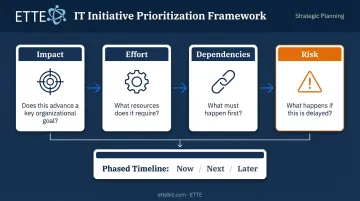
Initiatives are then sequenced into a phased timeline—what happens now, what happens next, and what can wait.
Step 4 – Build the Roadmap with a Budget
Structure the roadmap visually—by quarter and by year—including:
- One-time costs (hardware, implementation)
- Recurring expenses (licensing, subscriptions)
- Renewal timelines and vendor review dates
Putting these numbers together is easier with outside help. A trusted IT partner can gather vendor quotes, compare options, and structure a realistic multi-year budget. ETTE's Virtual CIO advisory service, for example, delivers a formal technology roadmap, a line-item annual IT budget, and quarterly business reviews — so DC-area nonprofits and small businesses have a clear picture of what's coming and what it will cost.
Step 5 – Review and Update Regularly
The IT roadmap is a living document, not a one-time deliverable. Quarterly reviews keep it accurate as organizational priorities shift, technology evolves, and budgets change.
A regular review cadence — whether with an internal IT leader or an external partner — keeps the roadmap current and connected to decisions leadership is actually making.
Signs Your Organization Needs an IT Roadmap
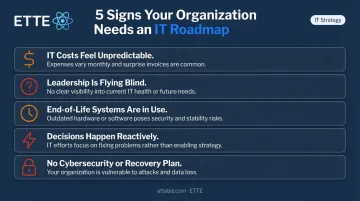
If any of the following sound familiar, the gap between where you are and where you need to be is larger than it looks:
- IT costs feel unpredictable — Expenses regularly exceed budget, and no one can answer "what will IT cost us next year?"
- Leadership is flying blind — There's no documented view of upcoming renewals, hardware aging out, or compliance deadlines
- End-of-life systems are in use — Aging servers, unsupported operating systems, or software the vendor no longer patches
- Decisions happen reactively — Technology choices are made in response to failures rather than in advance of them
- No documented cybersecurity or recovery plan — There's no formal policy for cybersecurity response, business continuity, or disaster recovery
Reactive IT management carries real consequences. Research consistently shows that nearly half of small businesses experience a cybersecurity breach or attack within any given year. Organizations without a plan don't just face technical disruption — they face financial exposure, reputational damage, and compliance liability.
The good news: no organization needs to have everything figured out before starting a roadmap. Even a simple first version — an honest inventory, a list of priorities, and a two-year budget by quarter — creates more visibility and control than operating without one.
Frequently Asked Questions
What is an IT roadmap?
An IT roadmap is a strategic, visual plan that outlines an organization's planned technology initiatives and investments over a defined period—typically one to three years—aligned to business goals. It shifts leadership from reactive problem-solving to informed, proactive decision-making.
What is the IT management roadmap?
An IT management roadmap focuses on how IT systems, teams, and processes will be managed and improved over time. CIOs and IT leaders use it to communicate priorities and progress to executive stakeholders across governance, staffing, and process maturation.
What should be included in an IT roadmap?
A complete IT roadmap covers the core elements needed to plan and track technology investments:
- Strategic goals and initiative timelines
- Cost estimates broken out by period
- Resource requirements and project dependencies
- Known risks with mitigation strategies
- KPIs to measure whether each initiative delivered its intended value
How is an IT roadmap different from an IT strategy?
An IT strategy defines the long-term vision and the reasons behind technology investments—the "why." An IT roadmap translates that strategy into a specific, time-bound plan of action—the "what" and "when." In short, strategy answers why you're investing in technology; the roadmap spells out exactly what you'll do and when.
How often should an IT roadmap be updated?
Quarterly reviews are the recommended best practice. The roadmap should be treated as a living document that evolves with organizational priorities, budget changes, and shifts in the technology landscape—not a static plan revisited once a year.
How long does it take to create an IT roadmap?
For a small organization working with an experienced IT partner, a practical initial roadmap can be developed in a matter of weeks. A more comprehensive roadmap—including environment assessment, stakeholder interviews, and multi-year budget modeling—typically takes 10–12 weeks.