Patch management is the structured process that closes these gaps before attackers can exploit them. It's not glamorous work, but it's foundational.
This guide is written for leaders and staff at nonprofits, associations, and small businesses who want to understand what patch management is, why it matters to their organization, and what a sound process looks like—even without a dedicated IT team.
Key Takeaways
- Patch management is the process of identifying, testing, and deploying software updates to fix vulnerabilities and keep systems stable
- Delayed patches drive major breaches — WannaCry and Equifax both exploited vulnerabilities with available fixes that were never applied
- The process follows a repeatable lifecycle: asset inventory, prioritization, testing, deployment, and verification
- HIPAA, GDPR, and PCI-DSS all require timely patching to meet compliance obligations
- Organizations without dedicated IT staff can bridge the resource gap through a managed IT provider
What Is Patch Management?
Patch management is the process of acquiring, testing, and deploying software updates—called patches—issued by vendors to fix vulnerabilities, correct bugs, and improve functionality across operating systems, applications, and firmware.
The key distinction from ad-hoc updates: patch management is a structured, repeatable process, not a one-time action. It spans the full lifecycle from discovering what needs a patch to confirming the fix was actually applied.
That full lifecycle is where patch management fits within the larger picture of vulnerability management. Patch management is a critical component of vulnerability management, but vulnerability management is the broader discipline—it covers identifying, prioritizing, and remediating all security weaknesses, not only those addressable through patches.
Types of Patches
Organizations encounter three main categories of patches:
- Security patches — Close known vulnerabilities before attackers can exploit them. These carry the highest priority in any patch program.
- Bug fixes — Correct software errors affecting stability or performance, such as crashes or memory leaks. They don't always have security implications, but they affect day-to-day reliability.
- Feature updates — Add or improve functionality on a regular release cycle, typically bundled into scheduled version releases.
- Hotfixes — Emergency patches deployed outside the normal schedule to address a critical vulnerability actively being exploited in the wild.
Why Patch Management Matters for Small Organizations
The Security Risk Is Real
Unpatched systems are one of the most common attack vectors because threat actors actively scan for and exploit known vulnerabilities. Two incidents from 2017 illustrate what's at stake when patches go unapplied.
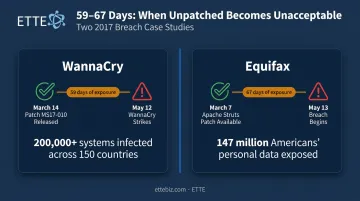
WannaCry (May 2017): Microsoft released patch MS17-010 on March 14, 2017—nearly two months before WannaCry emerged. Organizations that hadn't applied it were vulnerable. The attack reached 150-plus countries and caused losses ranging into the billions. In the UK alone, at least 81 NHS trusts were affected, disrupting patient care across hundreds of facilities.
Equifax (2017): A patch for the Apache Struts vulnerability (CVE-2017-5638) was available March 7, 2017. Attackers began exploiting Equifax's systems on May 13—over two months later. The breach exposed approximately 147 million people's personal data. Inadequate asset inventory meant the vulnerable system wasn't even on Equifax's radar for patching.
Small Organizations Are Not Exempt
The scale of WannaCry and Equifax can make patch failures feel like an enterprise problem. They aren't. CISA notes that cyber incidents have surged among small businesses, which often have fewer defensive resources to absorb the fallout. The UK's 2025/2026 Cyber Security Breaches Survey found that 46% of small businesses and 28% of charities identified a breach or attack in the survey period.
Nonprofits and associations handle sensitive donor, client, and member data. That makes them targets—not exemptions.
Compliance Obligations Add Legal Exposure
Skipping patches isn't just a security risk—it's a regulatory one:
| Framework | Core Patch Requirement |
|---|---|
| HIPAA | Risk analysis must address known vulnerabilities; unpatched systems have been cited in HHS enforcement actions. |
| GDPR / UK GDPR | Article 32 requires security measures appropriate to risk; inadequate patching has drawn ICO fines. |
| PCI-DSS v4.0.1 | Requirement 6.3.3 mandates critical patches within 30 days for cardholder data environments. |
Enforcement actions make the stakes concrete. HHS reached a $150,000 settlement with Anchorage Community Mental Health Services partly over failure to patch. In 2025, the UK's ICO fined Advanced Computer Software Group £3,076,320 (approx. $3.9M USD) with inadequate patch management among the contributing factors.
For nonprofits and small businesses operating on tight budgets, a single fine—or a single breach—can set the organization back years. Patch management is one of the lowest-cost controls available to prevent that outcome.
The Patch Management Process
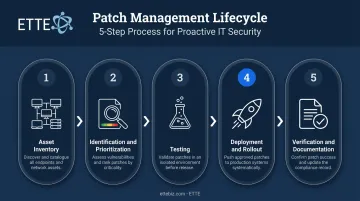
Effective patch management follows a five-step lifecycle. Each step builds on the previous one.
Step 1: Asset Inventory and Discovery
Before anything can be patched, you need to know what you have. Many organizations discover they have significantly more devices in use than they thought: old machines still in circulation, contractor laptops, personal phones accessing email.
A complete inventory covers every device, operating system, application, and connected endpoint. Without it, patch coverage is built on guesswork. ETTE begins every client engagement with a comprehensive discovery process that documents every device, account, and system configuration before any changes are made. You cannot patch what you cannot see.
Step 2: Patch Identification and Prioritization
IT teams monitor vendor security bulletins, CVE databases, and threat intelligence feeds to identify available patches. The CVE Program published 48,244 CVEs in 2025 alone—no team can treat every one as equally urgent.
Effective prioritization combines:
- CVSS severity scores (Critical: 9.0–10.0, High: 7.0–8.9) as an initial triage signal
- Active exploitation evidence from CISA's Known Exploited Vulnerabilities catalog
- Whether the vulnerable system is internet-facing (asset exposure)
- Business criticality: the operational and financial damage a successful compromise would cause
CVSS scores measure severity, not risk. Factoring in exploitation evidence and business context produces decisions a severity score alone cannot.
Step 3: Testing in a Controlled Environment
Patches should be applied to a non-production environment first. This verifies compatibility, identifies conflicts with existing software, and confirms that business processes still function normally before rolling out organization-wide.
Testing prevents the scenario where a patch fixes one problem while breaking another critical system. That breakage risk is exactly why many teams delay patching, making controlled testing the step that builds the confidence to move faster.
Step 4: Deployment and Rollout Strategy
Teams typically deploy patches in phased rollouts, starting with lower-risk systems and expanding from there. Scheduling deployments during maintenance windows minimizes disruption. Automated patch management tools (often built into Remote Monitoring and Management platforms) handle much of this at scale, reducing manual effort and ensuring coverage across remote devices.
Microsoft's Patch Tuesday (the second Tuesday of each month) creates a predictable cadence for Windows environments. Actively exploited vulnerabilities trigger out-of-band releases outside this schedule.
Step 5: Verification, Monitoring, and Documentation
After deployment, IT teams confirm patches were actually applied by scanning systems and reviewing logs. This step catches failures: cases where a patch appeared to deploy but never took effect.
Documentation of every patch cycle creates the audit trail needed for compliance reporting under HIPAA, PCI-DSS, and other frameworks. Ongoing monitoring ensures newly released patches are captured continuously, not just at scheduled intervals.
Common Patch Management Challenges
Volume and Alert Fatigue
With nearly 50,000 CVEs published in 2025, triage pressure is real. Small teams without a clear prioritization framework often default to either patching everything (unsustainable) or patching nothing (dangerous). A risk-based framework—using exploitation evidence, asset exposure, and severity scores together—makes the volume manageable.
Compatibility and Business Continuity Concerns
Teams sometimes delay patching out of fear that an update will break existing software. That fear isn't unfounded; compatibility issues do occur. The problem is that indefinite delay creates exactly the vulnerability window attackers look for. The practical fix is a testing environment and a documented rollback plan — not avoidance.
Shadow IT and Unmanaged Assets
Devices or software not tracked in the official inventory can go unpatched indefinitely. Nonprofits and associations are particularly exposed here — hybrid teams, volunteers, contractors, and BYOD arrangements all create visibility gaps. Addressing this requires two things:
- Continuous asset discovery to surface devices and software not in the official inventory
- Clear device policies that define what's permitted, especially for contractors and volunteers
Without both, the patch program only covers the assets you already know about — which is rarely all of them.
Best Practices for Effective Patch Management
Strong patch management comes down to five consistent habits. Skip any one of them and the others lose their effectiveness.
- Set a regular schedule and stick to it. Monthly cycles aligned with major vendor releases create predictability. Emergency protocols should exist for critical vulnerabilities that can't wait. Ad-hoc patching leaves gaps.
- Prioritize by risk, not just recency. A critical vulnerability on an internet-facing system needs faster action than a low-severity issue on an isolated internal tool. CISA's Binding Operational Directive 26-04 sets federal benchmarks of 3 to 30 days depending on exploitation status and exposure — private organizations can adopt the same benchmarks as a practical reference.
- Automate wherever possible. Manual patching across dozens of endpoints doesn't scale. Automated deployment through RMM platforms reduces human error and ensures remote devices get covered on the same timeline as on-site machines.
- Keep a live asset inventory and document every cycle. You can't patch what you don't know about. Documentation also creates the audit trail compliance reporting requires. For organizations without internal IT staff, ETTE handles this entire cycle — from asset tracking at onboarding through scheduled deployments and quarterly plain-language reporting leadership can act on.
- Test before production and keep a rollback plan. Even reliable patches occasionally introduce instability. A staging environment and rollback procedure are low-cost insurance against a broken production system.
Frequently Asked Questions
What are the best practices for patch management?
Maintain a current asset inventory, follow a documented patching schedule, use risk-based prioritization (combining CVSS scores, active exploitation data, and asset criticality), automate deployment where possible, test patches before organization-wide rollout, and document outcomes for compliance.
What are the different types of patch management?
Patch types include security patches, bug fixes, feature updates, and hotfixes. Delivery approaches include manual patching, automated agent-based deployment, cloud-based management, and managed service delivery where a provider handles the entire process on your behalf.
What is the difference between patch management and vulnerability management?
Patch management is the process of applying software updates to fix known issues. Vulnerability management is the broader discipline of continuously identifying, prioritizing, and remediating all security weaknesses across an organization—patch management is one critical tool within that larger program, but not the whole of it.
How often should patches be applied?
Most organizations run monthly patch cycles for standard updates, aligned to vendor release schedules. Critical security patches—especially for internet-facing systems—warrant faster action, often within days. Actively exploited zero-day vulnerabilities trigger emergency out-of-band patching outside the normal schedule.
What happens if an organization doesn't apply patches?
Unpatched systems expose organizations to ransomware, data breaches, and full system compromise—as both WannaCry and the Equifax breach demonstrated. Regulatory fines under HIPAA, GDPR, or PCI-DSS for failing to maintain up-to-date systems compound the security risk with legal liability.