Introduction
Credentials were compromised in 31% of small and medium business breaches according to the 2025 Verizon Data Breach Investigations Reportaccording to the 2025 Verizon Data Breach Investigations Report. For nonprofits, associations, and small businesses, that statistic isn't abstract — it means donor records exposed, member data leaked, financial accounts accessed, and weeks spent on recovery instead of mission.
Those consequences carry a price tag, too. The average credential breach takes 292 days to identify and contain, at a global average cost of $4.81M, according to IBM's 2024 Cost of a Data Breach Report. Even at a fraction of that scale, the impact on a 20-person nonprofit or regional association can be devastating.
Password security isn't an IT department problem. It's a daily habit every staff member, volunteer, and leader needs to practice. The ten tips below give your team a clear, actionable starting point.
Key Takeaways
- Use passwords that are at least 16 characters long ; length matters more than clever substitutions
- Never reuse passwords across accounts: one leaked password can expose every account that shares it
- A password manager is the single most practical step most organizations can take
- Enable MFA on every account you can, starting with email, financial, and admin access
- Password security is an ongoing organizational habit, not a one-time configuration
Why Password Security Matters for Organizations Like Yours
Small organizations are frequently targeted because attackers assume lighter security controls. Credential failures aren't just individual mistakes — they're organizational vulnerabilities that can expose every system your team touches.
The Regulatory Stakes Are Real
The consequences extend well beyond inconvenience. A breach involving donor or member data can trigger:
- State data breach notification laws — all 50 states require consumer disclosure when covered personal information is compromised, per NCSL's current summary
- Regulatory penalties — Blackbaud, a donor-management platform, paid a $49.5M multistate settlement following a breach tied to weak, default, and identical passwords plus inadequate MFA
- FTC enforcement — the subsequent FTC order against Blackbaud required data deletion, a retention schedule, and a comprehensive security program
The Cascade Problem
When one staff member reuses a weak password and those credentials surface in a breach database, attackers test that same username and password against your organizational email, cloud platforms, CRMs, and financial accounts — automatically and at scale. This technique, known as credential stuffing, is why password reuse transforms a single compromised account into a potential organizational breach.
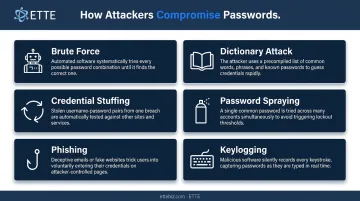
How Attackers Compromise Passwords
Knowing how attackers operate makes it far easier to explain — and enforce — good password habits with your team.
| Attack Method | How It Works |
|---|---|
| Brute Force | Automated guessing of every possible password combination |
| Dictionary Attack | Guesses drawn from word lists — fast and effective against short, common passwords |
| Credential Stuffing | Testing stolen username/password pairs from prior breaches across other services |
| Password Spraying | Trying one or two common passwords against many accounts to evade lockouts |
| Phishing | Tricking users into entering credentials on fake login pages |
| Keylogging | Malware that records keystrokes to capture passwords as they're typed |
The scale of stolen credentials in circulation is staggering. Have I Been Pwned has indexed over 17.6 billion compromised accounts across more than 1,000 breached websites. Attackers purchase these credentials from underground markets and run automated tools to test them across banking, email, and cloud platforms within hours.
A strong password reused across accounts is still a liability — once one site is breached, every account sharing that password is exposed.
10 Essential Password Security Tips
Creating Strong Passwords
Tip 1: Length is your most powerful defense.
Use at least 16 characters. CISA explicitly recommends this minimum, and NIST requires 15 characters for single-factor authentication. The math is decisive: a 12-character password using mixed character types would take an estimated 10 billion years to crack with bcrypt hashing — but password length above 16 characters pushes that into ranges that make brute force practically impossible within any attacker's realistic timeframe.
Tip 2: Use passphrases for memorability without sacrificing strength.
Combine four or more unrelated words — "PurpleHatBridgeSunday" — to create something both long and human-memorable. NIST explicitly recognizes passphrases as a valid approach and recommends that systems support them with generous maximum lengths.
Tip 3: Mix character types, but skip predictable substitutions.
Include uppercase, lowercase, numbers, and symbols. Just don't rely on swapping "E" for "3" or "A" for "@." NIST's own guidance confirms that attackers factor these substitutions into cracking tools — they add far less guessing resistance than most people assume.
Tip 4: Keep personal information out of passwords entirely.
Birthdays, pet names, hometowns, and family names are discoverable through social media and public records. They're also among the first inputs attackers try. Tip 4: Keep personal information out of passwords entirely.
Birthdays, pet names, hometowns, and family names are discoverable through social media and public records. Attackers run these inputs first — before random guessing ever begins.
Managing and Storing Passwords Safely
Tip 5: Use a unique password for every single account.
Bitwarden's 2024 six-country survey found that 48% of respondents reused passwords across workplace accounts. That number should alarm any organizational leader — because credential stuffing attacks exploit exactly this behavior. One breached account becomes a master key to everything else.
Tip 6: Use a password manager.
This is the single highest-impact step most organizations can take. A password manager:
- Generates unique, strong passwords for every account
- Stores them in encrypted form
- Flags weak, reused, or breached passwords automatically
- Fills credentials safely without exposing them to keyloggers via copy-paste
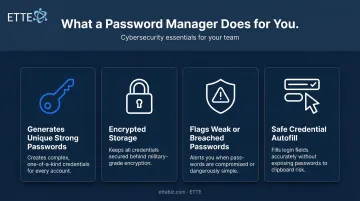
Users only need to remember one strong master passphrase. CISA and NIST both recommend password managers, including noting that verifiers should allow autofill and paste to support their use.
Tip 7: Check whether your credentials have already been exposed.
Visit Have I Been Pwned to check whether your email address or passwords appear in known breach databases. The service uses k-anonymity, so your password is never transmitted in full.
Many password managers include this breach-monitoring functionality automatically. Any exposed password should be changed immediately on every account where it was used.
Strengthening Accounts Beyond the Password
Tip 8: Enable Multi-Factor Authentication (MFA) on every account that supports it.
CISA states that MFA makes users 99% less likely to be hacked. Prioritize email, financial accounts, donor platforms, and any administrative access first. An authenticator app (not SMS where possible) is the recommended method — it means a stolen password alone isn't enough to get in.
Tip 9: Change default passwords immediately on all devices and systems.
Default credentials like "admin/admin" or "1111" are publicly documented. CISA documented a 2023 attack on water infrastructure systems where attackers exploited the default password "1111" on networked PLCs. Apply the same discipline to office routers, shared printers, and any networked hardware.
Tip 10: Never share passwords or enter them on shared or public devices.
Shared credentials create accountability gaps and unmanageable access — if a shared account is compromised, there's no way to know who was responsible or when the breach occurred. Public computers may run keyloggers. Instruct staff clearly: no legitimate IT provider, vendor, or manager will ever ask for a password. Any such request should be treated as phishing.
Common Password Security Mistakes to Avoid
These mistakes show up repeatedly across nonprofits, associations, and small businesses — and each one creates real exposure:
Incremental variations — "Password2023" becoming "Password2024" isn't a new password. NIST confirms that composition rules drive exactly these predictable modifications, which add no meaningful security. Blocklists should reject these patterns outright.
Storing passwords in plaintext — spreadsheets, sticky notes, email drafts, and unencrypted browser saves each hand attackers everything the moment a device is accessed or compromised.
Ignoring breach notifications — an exposed password should be treated as already compromised. Change it immediately on every account where it was reused.
Building a Password Security Policy for Your Team
Individual best practices only hold if they're applied consistently across the whole organization. One staff member with a weak, reused password can become the entry point for a full breach — regardless of what everyone else is doing right.
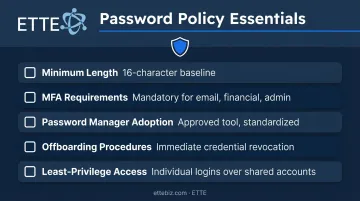
A written password policy should cover:
- Minimum length — 16 characters as the organizational baseline
- MFA requirements — mandatory for email, financial, donor platforms, and admin accounts
- Password manager adoption — specify an approved tool and make it standard
- Offboarding procedures — revoke credentials immediately when staff depart; CISA's Cybersecurity Performance Goals explicitly call out preventing former employees from retaining unauthorized access
- Least-privilege access — not everyone needs admin credentials; replace shared accounts with individual logins wherever possible
For nonprofits, associations, and small businesses managing shared tools, CRMs, and donor platforms, access control hygiene matters just as much as password strength. Granting broad permissions by default — because it's convenient — creates outsized exposure when any single account is compromised. A policy that addresses both password requirements and access scope closes that gap.
ETTE's GuardRail security scoring gives organizations a structured starting point for exactly this work. Its Identity & Access Posture assessment evaluates MFA status, conditional access rules, and privileged account security — then delivers findings as plain-language reporting that leadership can act on directly.
Frequently Asked Questions
Have passwords been compromised in data breaches?
Billions of credentials have been exposed in publicly known breaches. Have I Been Pwned has indexed over 17.6 billion compromised accounts; you can check whether your email address appears there for free. Any exposed password should be changed immediately on every account where it was used.
What are the most common passwords to avoid?
Specops ranked "123456," "123456789," and "12345678" as the top three most common passwords found in stolen credentials. Any password using a single word, sequential numbers, or keyboard patterns ("qwerty," "password") can be cracked in seconds with automated tools.
What is the most secure way to store passwords?
A dedicated password manager is the most secure storage method — more reliable than a browser's built-in save feature or a spreadsheet. It encrypts credentials behind a master passphrase and should itself be protected with MFA.
How often should you change your passwords?
Current NIST guidance no longer recommends mandatory periodic changes. Use strong, unique passwords from the start and change them immediately if a breach is detected or suspected.
What is multi-factor authentication and why does it matter?
MFA requires a second form of verification beyond the password — such as a one-time code from an authenticator app or a biometric scan. Even if an attacker steals a password, they can't access the account without the second factor.
How long should a strong password be?
CISA recommends at least 16 characters; NIST requires 15 for single-factor authentication. A passphrase made of four or more unrelated words is an excellent way to meet this standard while remaining memorable enough to actually use.