Key Takeaways
- Zero Trust operates on "never trust, always verify" — no user or device gets automatic access based on network location
- The framework rests on three principles: verify every access request explicitly, grant least privilege only, and operate assuming a breach has already occurred
- Ransomware appeared in 88% of small-organization breaches in 2025, making Zero Trust critical for organizations of any size
- Implementation is phased — enforcing MFA and auditing access are meaningful first steps
- Nonprofits and associations are high-value targets — donor records, financial data, and member information all carry real risk
What Is Zero Trust Security?
Zero Trust is a security framework built on a simple but consequential principle: no user, device, or system is automatically trusted — regardless of whether it sits inside or outside your network. Every access request gets verified. Every time.
Forrester Research analyst John Kindervag introduced the model in his 2010 report, "No More Chewy Centers: Introducing the Zero Trust Model of Information Security", which observed that risk exists both inside and outside the network perimeter. The pandemic-era surge in remote work and cloud adoption pushed organizations worldwide to take the model seriously.
What Zero Trust Is Not
Zero Trust is often misunderstood — here's what it isn't:
- Not a single product — NIST describes it as "an evolving set of cybersecurity paradigms," not a tool you purchase
- Not a VPN replacement on its own — Zero Trust Network Access (ZTNA) is one component, not the whole architecture
- Not achievable overnight — it's a phased journey that improves security posture incrementally
- Not only for large enterprises — organizations of 10 staff face the same threats as those with 10,000
How It Differs from Traditional Security
Traditional "castle-and-moat" models assume that anything inside the network is trustworthy. Once an attacker crossed the perimeter — through stolen credentials, a phishing link, or a compromised vendor account — they had broad, implicit access to everything inside.
Zero Trust eliminates that assumption. Instead of asking "are you inside the network?", the framework asks "can you prove you should have access to this specific resource, right now?" That shift in logic is what makes it effective against modern threats.
The Three Core Principles of Zero Trust
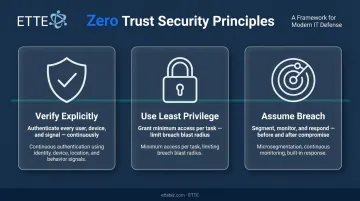
NIST Special Publication 800-207, the vendor-neutral standard for Zero Trust architecture, organizes the framework around three foundational principles.
Verify Explicitly
Every access request — from any user, any device, any location — must be authenticated and authorized using all available signals: identity, device health, location, and behavioral context. Verification isn't a one-time gate at login. It's continuous throughout a session.
A user who logs in from a known device in Washington, DC gets a different risk profile than the same credentials appearing from an unfamiliar device in another country at 2 AM. Zero Trust acts on that difference in real time.
Use Least Privilege Access
Users and systems receive only the minimum access needed for a specific task — and only for as long as that task requires. An accountant doesn't need access to HR files. A volunteer coordinator doesn't need administrative rights to cloud storage.
This principle matters because it limits the "blast radius" of a compromised account. If an attacker gains access to a restricted account, they're contained to a narrow slice of resources rather than the entire environment.
Assume Breach
Zero Trust organizations operate as if attackers may already be inside. That assumption drives concrete design choices:
- Microsegmentation — dividing the network into isolated zones so an attacker in one segment can't move laterally to others
- Continuous monitoring — watching for anomalous behavior that signals an active intrusion
- Built-in response capabilities — detection and containment are standard operations, not emergency measures
According to CISA's microsegmentation guidance, dividing networks according to application and data communication needs reduces attack surface, limits lateral movement, and increases visibility — making containment far more effective when prevention fails.
Together, these principles create overlapping layers of protection. For organizations with limited security staff — a common reality in nonprofits and small businesses — that layered design is what makes Zero Trust practical rather than just theoretical.
How Zero Trust Differs from Traditional Perimeter Security
The legacy model worked on a geographic metaphor: build a hard shell around the network with firewalls and VPNs, and trust everything inside. That made sense when staff worked in a single office, data lived on local servers, and vendors had no direct system access.
That environment no longer exists for most organizations.
Today's reality includes remote and hybrid staff, data distributed across SaaS platforms and cloud storage, and third-party vendors with direct connections into internal systems. The perimeter, as a concept, has dissolved.
What Perimeter Security Cannot Address
Three specific attack vectors consistently bypass perimeter defenses:
- Credential theft and phishing — attackers enter through legitimate credentials, never triggering perimeter alerts
- Insider threats — employees or contractors with legitimate access can misuse it without crossing any perimeter
- Compromised vendors — third-party accounts that connect to internal systems carry their own risk profile
The numbers from Verizon's 2025 Data Breach Investigations Report put scale on the problem: credential abuse appeared in 22% of breaches, the human element remained a factor in roughly 60% of breaches, and third-party involvement in breaches doubled from 15% to 30% in a single year.
For nonprofits and small organizations, these aren't abstract statistics — they describe the exact exposure that comes with shared credentials, staff turnover, and vendor access granted without review. Zero Trust addresses all three vectors by anchoring protection to the individual resource, user, and device, with access decisions made in real time based on current context rather than network location.
The Five Pillars of a Zero Trust Architecture
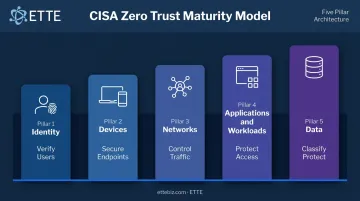
CISA's Zero Trust Maturity Model Version 2.0 defines five functional areas organizations must address to build a complete Zero Trust architecture.
Identity
Identity is the primary control plane. Before any resource access is granted, every user must authenticate through strong methods. This pillar covers:
- Multi-factor authentication (MFA) — required at initial stages, advancing to phishing-resistant MFA at higher maturity
- Single sign-on (SSO) — centralized, secure authentication across systems
- Identity and access management (IAM) — including periodic access reviews and activity logging
Devices
Every device that touches organizational systems — laptops, phones, IoT devices, printers — must meet defined security standards before access is granted. Zero Trust requires an accurate inventory of all authorized devices and continuous health-status checking, not just a one-time enrollment.
Networks
Traditional network access gives too much ground once a user is inside the perimeter. Zero Trust replaces that model with:
- Microsegmentation — dividing the network so users only reach what they need
- Encrypted traffic — protecting data in motion across all segments
- Continuous monitoring — watching for lateral movement, unusual transfers, or access pattern changes that signal a breach in progress
Applications and Workloads
Applications and APIs don't get automatic trust. Access to each application must be authorized per-session and continuously validated — not granted once at login and left open indefinitely.
This applies equally to SaaS tools like Microsoft 365, cloud workloads, and internal line-of-business applications.
Data
Data is the ultimate asset being protected. Under Zero Trust, organizations:
- Classify data by sensitivity level
- Apply targeted access controls based on classification
- Encrypt data in transit and at rest
- Monitor data activity for signs of unauthorized access or exfiltration
For ETTE's nonprofit and association clients, this typically means donor records, payroll data, client case files, and finance system data each carry different risk profiles — and each needs its own classification level, access controls, and monitoring threshold.
Who Benefits Most from Zero Trust?
The common assumption that Zero Trust is only for large enterprises doesn't hold up. According to the 2025 DBIR, ransomware appeared in 88% of breaches affecting small organizations (defined as 1,000 employees or fewer). Attackers target smaller organizations precisely because limited security resources often mean inconsistent controls.
Nonprofits, associations, and small businesses in Washington, DC face a specific combination of risk factors:
- Sensitive data (donor records, member information, grant financials, health-adjacent data) that attackers find valuable
- Hybrid and remote workforces that blur traditional security boundaries
- Budget constraints that historically de-prioritized security investment
- High staff turnover and volunteer access that creates credential management gaps
- Reliance on third-party platforms for accounting, donor management, payroll, and communications
These risk factors map directly to Zero Trust capabilities — which makes the framework practical, not theoretical, for mission-driven organizations.
Practical Zero Trust Use Cases for Mission-Driven Organizations
| Challenge | Zero Trust Response |
|---|---|
| Remote staff on personal devices | Device health checks + conditional access policies |
| Contractor and volunteer access | Least-privilege provisioning + clean offboarding |
| Microsoft 365 over-permissions | Identity pillar controls + periodic access reviews |
| Vendor with internal system access | Microsegmentation + session-based authorization |
| Staff turnover leaving orphaned accounts | Automated JML (joiner/mover/leaver) workflows |
Organizations with compliance requirements — those handling health information, federal grant funds, or financial data — get an additional benefit. Zero Trust's built-in audit trails, granular access logs, and enforced controls directly support compliance documentation without requiring separate tooling.
For organizations that need to demonstrate security maturity to boards or funders, ETTE GuardRail translates security posture into plain-language scoring and board-ready reporting — giving leadership the visibility to make informed decisions.
How to Begin Your Zero Trust Journey
NIST is direct on this point: Zero Trust adoption cannot be achieved through wholesale technology replacement. Most organizations will operate in a hybrid mode during modernization, gradually expanding Zero Trust controls while maintaining existing infrastructure. CISA structures this as a progression from Traditional through Initial, Advanced, and Optimal maturity stages.
The practical implication: start with high-impact, lower-cost actions.
Three Foundational First Steps
Conduct an identity and access audit — Map who has access to what across every system. Identify over-privileged accounts, shared credentials, and dormant accounts from past staff or volunteers. This single step frequently surfaces significant risk.
Enable MFA across critical systems — Prioritize email and cloud applications first. MFA is the single most effective control against credential-based attacks, and it's available in most platforms organizations already use.
Classify your data — Understand what sensitive data your organization holds, where it lives, and who currently has access. Donor records, grant financials, and payroll data should each have explicit access controls tied to role, not inherited from a default configuration.
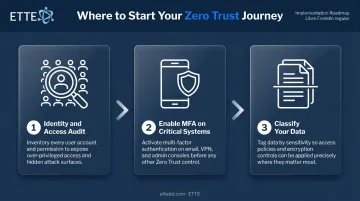
None of these steps require an architecture overhaul — and together, they address the most common attack vectors. That's a meaningful risk reduction before any larger investment.
Partnering for Faster Progress
For organizations without a dedicated IT security team, building Zero Trust-aligned controls is hard to prioritize alongside day-to-day operations. The work is real — and it competes with everything else.
ETTE's security-first managed IT approach helps Washington, DC nonprofits, associations, and small businesses establish Zero Trust-aligned environments from day one, with documented configurations, layered protections, and structured access controls. That includes least-privilege provisioning for contractors and volunteers, MFA enforcement across Microsoft 365, and regular access reviews that prevent permission drift over time.
Frequently Asked Questions
What is zero trust security?
Zero Trust is a security model based on "never trust, always verify." Every user and device must be continuously verified before accessing any resource, regardless of network location. It contrasts directly with older models that trusted anything inside the network perimeter.
How much does zero trust cost?
Foundational steps like enforcing MFA and auditing access carry low or no additional cost. More advanced components — microsegmentation, ZTNA tools — involve real investment, but that cost looks different against the average breach cost of $3.31 million for organizations under 500 employees, per IBM's 2023 Cost of a Data Breach report.
Is Zero Trust only for large enterprises?
No. Zero Trust principles apply to any organization that holds sensitive data and faces credential, phishing, or insider threats — which includes virtually every nonprofit, association, and small business. Smaller organizations often benefit most from Zero Trust's structured approach given their limited security resources.
What is the difference between Zero Trust and a VPN?
VPNs grant broad network access once a user connects. Zero Trust grants access only to the specific resources an authenticated user is authorized to use, and continuously re-verifies that authorization. VPN access is typically persistent; Zero Trust access is context-dependent and session-specific.
How does Zero Trust help protect against insider threats?
By enforcing least privilege and continuously monitoring user behavior, Zero Trust limits what any individual — whether malicious or compromised — can access. Internal actors were involved in 18% of breaches in the 2025 Verizon Data Breach Investigations Report. Unusual activity triggers alerts, containing damage before it spreads across systems.
What is the first step to implementing Zero Trust?
Start with an identity and access audit — understanding who has access to what across every system — and enable MFA on critical platforms. These two steps address the most common attack vectors and directly align with Zero Trust's "verify explicitly" principle without requiring a full architecture redesign.