Introduction
Picture this: your nonprofit's executive director gets an email on a Tuesday afternoon — a compliance audit is scheduled for next month. She forwards it to you with a single question: "Are we ready?" You open your files and find a policy document last updated in 2021, a training log with three names on it, and a network diagram no one has touched since you moved offices.
This scenario plays out regularly for small organizations — nonprofits, associations, and small businesses — that handle sensitive data but don't have a dedicated security team to stay on top of it. The stakes are real: IBM's 2023 Cost of a Data Breach Report found that organizations with fewer than 500 employees averaged $3.31 million per breach in 2023, up 13.4% from the prior year.
This guide covers what security compliance actually is, the three control categories auditors examine, which frameworks matter most for small organizations, and practical steps to build a program that holds up under scrutiny.
What Is Security Compliance and Why Does It Matter?
Security compliance is the ongoing practice of implementing controls, policies, and processes that meet regulatory requirements, industry standards, and internal security objectives. The operative word is ongoing — a passed audit is a snapshot in time, not a permanent status.
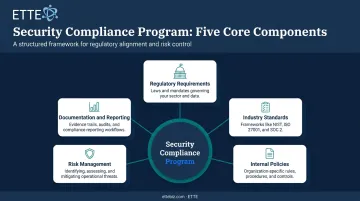
Every functional compliance program addresses five components:
- Regulatory requirements — laws your organization must follow (HIPAA if you handle health data, PCI DSS if you process payments)
- Industry standards — voluntary frameworks that define control expectations (NIST CSF, ISO 27001)
- Internal policies — organization-specific rules governing how staff use systems and handle data
- Risk management — identifying threats, assessing their likelihood, and reducing exposure
- Documentation and reporting — proving that controls exist, function, and are reviewed regularly
Compliance Is Not the Same as Security
This distinction matters more than most small organizations realize. Compliance sets a minimum baseline you must meet. Security is the broader, continuous practice of actually protecting your systems and data. You can satisfy one without achieving the other.
Consider a common scenario: an organization implements multi-factor authentication (MFA) to meet a PCI DSS requirement on its payment processing system. Compliance box checked. But if that same MFA standard isn't applied to cloud storage or remote access tools, a meaningful security gap remains — one that auditors from a different framework might catch, or attackers will.
ETTE's documentation captures this well: "cloud platforms can support compliance, but they do not guarantee it on their own. Configuration, policy, and oversight still matter." The practical takeaway: treat your audit requirements as the floor, not the ceiling.
Why It Matters for Small Organizations
Many small organizations assume compliance obligations mainly apply to large enterprises with dedicated legal and security teams. They don't. Nonprofits that handle health-related information may qualify as HIPAA covered entities or business associates regardless of their tax status.
Any organization processing payment card transactions falls under PCI DSS, whether it's a 12-person association or a Fortune 500 company.
The consequences for small organizations are significant — and often organization-threatening. Two enforcement cases illustrate the point:
- Maryland-based Green Ridge Behavioral Health agreed to a $40,000 HIPAA settlement after a ransomware investigation involving PHI for more than 14,000 people, plus a three-year corrective action plan
- A solo medical practitioner paid $100,000 for Security Rule failures
Neither organization had the resources to absorb those outcomes easily.
The Three Types of Security Controls
Compliance frameworks don't just ask whether you have security software. They assess controls across three distinct categories — physical, technical, and administrative. A gap in any one category can result in audit findings, even if the other two are solid.
Physical Controls
Physical controls restrict unauthorized access to hardware, servers, and the facilities that house them. For small organizations, relevant examples include:
- Locked server rooms or wiring closets
- Keycard or badge access for sensitive areas
- Visitor logs for office entry
- Security cameras covering equipment areas
- Clean desk policies for workstations with sensitive data
Physical controls are frequently the most overlooked category — especially for organizations in shared office space or co-working environments, where entry points, server racks, or networking equipment may be accessible to non-staff. Auditors notice this. An unlocked closet housing a network switch in a shared hallway is a finding, regardless of how strong your technical controls are.
Technical Controls
Technical controls are the software and system-level safeguards that protect data and networks. These are the most visible controls to auditors and include:
- Multi-factor authentication (MFA) — applied consistently across all systems, not just the primary application
- Endpoint protection — centrally monitored antivirus or endpoint detection tools, with remote wipe capability
- Firewalls and network segmentation — including guest Wi-Fi separation from internal networks
- Data encryption — both in transit and at rest, including device-level encryption for laptops
- Patch management — timely, documented updates across endpoints, servers, and software
- Identity and access management (IAM) — role-based access with documented onboarding, role-change, and offboarding workflows
- Email security — advanced filtering and conditional access, given that email remains the most common attack entry point
- Backup validation — regular, documented restoration testing, not just backup creation
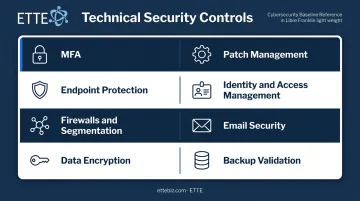
ETTE implements these controls as part of its cybersecurity baseline for managed IT clients, matching specific control combinations to each organization's risk profile and compliance obligations rather than applying a one-size-fits-all package.
Administrative Controls
Administrative controls are the policies, procedures, and governance structures that govern how people use systems. They define how technical and physical controls are actually used and maintained — and they're what auditors scrutinize most carefully when assessing whether a compliance program is real or just documented in name.
Auditors look for documented, enforced policies, not informal practices. Key administrative controls include:
- Acceptable use policies covering devices, data, and internet access
- Employee security awareness training with documented completion records
- Incident response procedures with defined escalation paths and notification timelines
- Access provisioning and de-provisioning protocols — particularly critical when staff turn over
- Payment authorization and data sharing procedures that limit fraud exposure
- Vendor change procedures to prevent social engineering during supplier transitions
ETTE's Virtual CIO service addresses administrative controls at the governance level: reviewing policies, managing risk registers, coordinating vendor decisions, and preparing board-ready reporting. These functions require sustained leadership attention — not a policy template written once and never revisited.
Key Security Compliance Frameworks Small Organizations Should Know
A compliance framework is a structured set of guidelines that tells you what controls to implement and how to demonstrate they're working. Choosing the right framework depends on your industry, the type of data you handle, and your contractual obligations — not on what's popular.
| Framework | Type | Applies When |
|---|---|---|
| NIST CSF 2.0 | Voluntary | Any size or sector; strong starting point for organizations with no existing program |
| HIPAA Security Rule | Mandatory federal law | You're a covered health entity or business associate handling electronic PHI |
| SOC 2 | CPA assurance reporting | Customers or contracts require demonstrated security assurance |
| PCI DSS v4.0.1 | Mandatory payment standard | You store, process, or transmit payment card data |
NIST CSF 2.0 is organized around six functions — Govern, Identify, Protect, Detect, Respond, and Recover — and NIST published a Small Business Quick-Start Guide to make the framework accessible for lean teams. For organizations with no prior compliance program, it's a practical starting point.
If your organization falls under multiple frameworks, official crosswalks exist between NIST CSF and HIPAA, and between NIST CSF and PCI DSS. These mappings mean controls and evidence can often be reused — but they don't establish automatic compliance. Each framework has specific requirements that must be tested independently. The benefit is reduced duplication of effort, not a shortcut around framework-specific obligations.
That crosswalk point is especially relevant for nonprofits navigating HIPAA. Coverage is determined by organizational function, not tax status — a nonprofit that performs business-associate functions involving protected health information is subject to HIPAA's Security Rule whether or not it's a 501(c)(3).
Best Practices for Building an Audit-Ready Security Program
Start with Risk Assessment
Every auditor's first question is some version of: "How do you know what you need to protect?" A documented risk assessment answers it. Assess which IT assets are most critical, what threats could affect them, and whether current controls reduce that risk adequately.
HIPAA doesn't specify a fixed frequency for risk analysis — HHS says it should be ongoing. A practical baseline for most small organizations is a formal assessment at least annually, plus reassessments after significant changes: a new system, a merger, a key staff departure, or a move to a new cloud platform.
HHS audited 166 covered entities and found that 86% failed their risk analysis obligations and 94% failed risk management requirements.
Automate Controls Where Possible
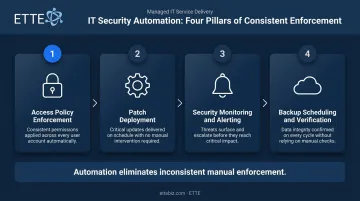
Manual controls fail under pressure. Staff forget steps, people leave, and enforcement becomes inconsistent. Automate what you can:
- Access policy enforcement (conditional access, MFA requirements)
- Patch deployment across endpoints and servers
- Security monitoring and alerting
- Backup scheduling and verification
Automation removes the dependency on any individual remembering to act — and eliminates a common audit finding: controls that existed on paper but weren't consistently applied.
Build and Test an Incident Response Plan
A written incident response plan needs defined roles, escalation paths, and regulatory notification timelines. Writing it is not enough — test it with at least one tabletop exercise annually and document the results as audit evidence.
A structured classification framework helps clarify which incidents require formal response. Common categories to define include:
- Phishing compromise and credential theft
- Ransomware or destructive malware
- Lost or stolen devices
- Unauthorized cloud access or data exposure
Escalation rules should specify when each category triggers a formal notification obligation under applicable regulations.
Train Staff — Consistently
Verizon's 2024 Data Breach Investigations Report found a non-malicious human element in 68% of breaches — social engineering, errors, or misuse. Policy documentation alone doesn't close that gap.
Training should cover:
- Phishing recognition and reporting procedures
- Password hygiene and MFA use
- Acceptable use of devices and data
- What to do when something seems wrong
Maintain training completion logs. Auditors will ask for them.
Maintain Organized, Retrievable Documentation
Audit readiness is fundamentally a documentation problem. Organizations that can't produce evidence of control operation — regardless of whether controls actually functioned — face findings.
Evidence that should be current and accessible at all times:
- Policies, with review dates
- Risk assessment records and remediation tracking
- Access control logs (provisioning and de-provisioning)
- Patch management records
- Training completion records
- Incident reports and post-incident reviews
- Backup testing confirmations
ETTE's "documented environments from day one" approach addresses this directly. During onboarding, ETTE executes a structured discovery process — device and hardware inventory, account and identity records, application inventory, network diagrams, vendor relationships, system configurations, and security baselines — before any changes are made.
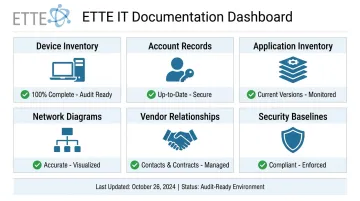
When an audit or insurance renewal arrives, the evidence already exists. No scrambling to reconstruct records under a deadline.
Monitor Continuously, Report Clearly
Organizations that treat compliance as a year-round discipline face far less audit burden than those who scramble in the weeks before an audit date. ETTE GuardRail provides ongoing security posture scoring and board-ready reporting that keeps leadership informed without requiring technical expertise — translating control status into plain-language assessments leadership can act on.
How to Prepare for a Security Compliance Audit
Step 1: Conduct a Pre-Audit Gap Assessment
Compare your current controls and documentation against the specific requirements of the applicable framework. For each requirement, determine:
- Is this control in place?
- Is there documented evidence it works?
- Are there gaps in coverage?
Prioritize closing highest-risk gaps first. Documentation gaps are as problematic as control gaps — auditors need proof of operation, not just proof of existence.
Step 2: Organize Your Audit Evidence Package
Compile the following into an auditor-ready package before the audit date:
- Written policies with documented review dates
- Network diagrams and asset inventories
- Access control records (who has access to what, and when changes were made)
- Training completion logs for all active staff
- Patch management records
- Incident reports and response documentation
- Backup testing confirmations
Step 3: Work with a Trusted IT Partner
Organizations that maintained documented environments from day one spend far less time preparing for audits than those reconstructing records under deadline pressure. The difference shows up clearly in a scenario ETTE sees regularly across Washington, DC nonprofits: when a mid-sized organization faces a cyber insurance renewal and a funder security questionnaire in the same quarter, two very different outcomes emerge.
Organizations with organized documentation respond with confidence. Those without it spend weeks in emergency evidence-gathering — and often still submit incomplete packages. The key documents that separate them:
- Timestamped policy reviews
- Access logs showing who had access and when it changed
- Backup test results with dates
- Training completion records for all active staff
Working with a managed IT partner that includes Virtual CISO capabilities means this documentation exists before the audit request arrives. Gap identification, evidence management, and audit coordination become part of ongoing service delivery — not a scramble triggered by a deadline.
Frequently Asked Questions
What is security compliance?
Security compliance is the ongoing practice of implementing policies, controls, and processes to meet regulatory requirements, industry standards, and internal security objectives. Remaining compliant requires continuous maintenance as systems, staff, and threats change over time.
What are the types of security compliance?
The main categories are regulatory compliance (mandatory laws such as HIPAA and PCI DSS), standards-based compliance (voluntary frameworks like NIST CSF and ISO 27001), and internal policy compliance (organization-specific rules and procedures). Most organizations are subject to more than one category simultaneously.
What are the basic security principles?
The foundational CIA triad covers Confidentiality (protecting data from unauthorized access), Integrity (ensuring data is accurate and unaltered), and Availability (ensuring authorized users can access systems when needed). Every major compliance framework builds its control requirements around these three objectives.
What is the difference between security and compliance?
Compliance means meeting a defined minimum standard set by a regulator or framework. Security is the broader, continuous practice of protecting systems and data from actual threats. Genuine security goes beyond the checklist to address risks the framework may not have anticipated.
How often should a small organization conduct a security compliance audit?
At minimum, conduct a formal internal audit annually. Additional assessments should be triggered by significant organizational changes — new systems, staff changes, mergers, or new vendor relationships. Continuous monitoring throughout the year makes those formal audits far less burdensome.