That's exactly what Remote Monitoring and Management (RMM) provides. It's the technology that allows IT teams and managed service providers to observe, maintain, and secure an organization's IT environment around the clock — without needing to be physically present.
For small organizations like nonprofits and associations in Washington, DC, RMM is less of a luxury and more of a practical necessity. Most don't have the staff or budget for a full in-house IT department, but they still carry real cybersecurity exposure and operational risk.
This post covers what RMM is, how it works, its core benefits for lean organizations, and what to look for when evaluating an RMM-backed IT solution.
Key Takeaways
- RMM gives IT teams centralized, real-time visibility into all endpoints, servers, and network devices from a single dashboard
- It enables proactive issue detection — catching problems before they cause downtime or data loss
- Small organizations and nonprofits benefit most, since RMM replaces the need for large in-house IT teams
- Modern RMM supports both on-premises and cloud infrastructure — whether your team runs cloud tools, on-site servers, or a mix of both
- MSPs like ETTE use RMM to monitor endpoints, automate patching, and deliver proactive IT support without requiring clients to staff an internal IT team
What Is Remote Monitoring and Management (RMM)?
Most IT problems don't announce themselves — they build quietly until something breaks. RMM software exists to catch them first.
As defined by TechTarget, RMM is software used by IT service providers and IT departments to maintain client or organizational IT assets, infrastructure, and systems. It monitors endpoints — servers, desktops, applications, and mobile devices — and can automate tasks and scripts.
In plain terms: RMM is a continuous oversight layer across your entire IT environment, not a single security tool.
Monitoring vs. Management
These two terms mean distinct things in practice:
- Monitoring — Real-time visibility into system health, performance, and security events across all devices and networks
- Management — The ability to act on that data: applying patches, pushing updates, restarting services, or resolving issues remotely without an on-site visit
When something flags an alert, the IT team investigates and resolves it — often before the end user ever notices a problem. That's the full cycle: visibility, then action.
How RMM Differs from Antivirus or Firewall Tools
A firewall controls traffic at the network perimeter. Antivirus detects known malicious signatures. Both are valuable — but neither tells you whether your servers are healthy, your endpoints are patched, your backups ran last night, or whether someone is making suspicious login attempts.
A firewall alone isn't enough. RMM isn't a replacement for those security tools — it's the broader layer that monitors and oversees them across your entire environment.
Who Uses RMM?
- Managed service providers (MSPs) — Use RMM to monitor and manage IT environments for multiple client organizations from one platform simultaneously
- Internal IT departments — Use it to maintain visibility and control across distributed devices and locations
You may also see RMM referred to as "remote IT management," "network monitoring," or "managed monitoring." Note that "remote monitoring" in healthcare refers to Remote Patient Monitoring (RPM) — a separate concept.
How Does RMM Work?
RMM operates through two core components: an agent installed on each managed device, and a centralized console where IT teams view data and take action.
The Agent Layer
A lightweight software agent is installed on each device — desktops, servers, laptops, mobile devices. That agent continuously collects data: CPU usage, disk health, OS status, patch compliance, network activity. It sends this information back to the RMM platform in real time.
CISA describes this component as an agent that "continuously monitors machine or system health and status." At ETTE, managed servers are monitored at 30-second intervals, meaning performance degradation is caught quickly rather than discovered after the fact.
The Central Dashboard
All device data flows into a single console. From there, IT administrators can:
- View real-time health status across all monitored systems
- Review and prioritize alerts
- Remotely access and control devices to resolve issues
- Track patch compliance and asset inventory
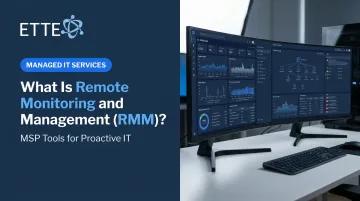
ETTE's monitoring console aggregates data from endpoints, servers, network infrastructure, cloud services, and backup systems into a unified view — correlating alerts and performance signals in near real-time to surface patterns before they become problems.
The Alert-and-Response Workflow
When a monitored metric crosses a defined threshold, the RMM platform generates an alert. Common triggers include disk usage hitting 90%, a failed backup, repeated failed login attempts, or a missed patch. The IT team investigates and resolves the issue — typically before the end user notices anything is wrong.
Automated Tasks
Modern RMM platforms handle many routine tasks without human intervention:
- Applying OS and software patches on scheduled windows (often after hours)
- Restarting hung services automatically
- Running maintenance scripts on a defined cadence
- Verifying backup health and flagging errors
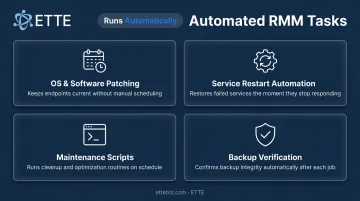
For nonprofits and small businesses with lean IT staff, this means routine maintenance runs in the background — no manual device-by-device intervention required.
Key Benefits of RMM for Small Organizations and Nonprofits
Proactive Prevention vs. Break-Fix Firefighting
Break-fix support is reactive by design — you call for help after something fails, and pay for time and materials. For a nonprofit in the middle of a fundraising campaign or a grant deadline, that model carries real operational risk: you only find out about the problem after it's already disrupting operations.
RMM flips that equation. Issues are detected continuously and resolved remotely, often before staff are affected. That's a fundamentally different operating model — not just a faster version of the same one.
Stronger Security Posture Without a Dedicated Security Team
According to Verizon's 2025 Data Breach Investigations Report, ransomware appeared in 88% of SMB breaches — compared to 39% for large organizations. And vulnerability exploitation accounted for 20% of initial access events in 2025, up 34% year over year.
RMM directly addresses this exposure through:
- Tracks patch status across every endpoint for OS and application updates
- Flags unauthorized access attempts, anomalous network behavior, and suspicious activity
- Confirms antivirus, EDR, and other security tools are active on all devices
- Maintains tamper-resistant audit logs for compliance reviews and cyber insurance documentation
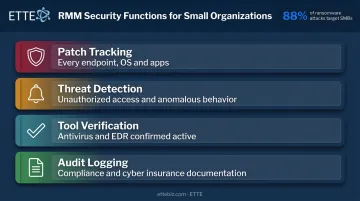
ETTE's platform supports cross-platform coverage — Windows, macOS, Linux, Android, iOS, and network hardware including firewalls, routers, and switches — so no device category falls through the cracks.
Cost Efficiency for Lean Teams
The U.S. median annual wage for a network and computer systems administrator was $96,800 in May 2024, per the Bureau of Labor Statistics — and that figure doesn't include benefits, recruiting, training, or the fact that one person can't cover everything a 50-person nonprofit needs.
RMM allows a small IT team or MSP to manage many systems simultaneously from a single platform, removing the need for on-site visits for routine tasks. For nonprofits and associations operating with tight budgets, that kind of reach — without the headcount — is what makes enterprise-grade oversight achievable.
Transparent Reporting Leadership Can Actually Use
RMM platforms generate detailed logs and reports on system health, patch status, incident history, and security posture. For nonprofit executive directors and board members, that data needs to be translated — not just handed over as raw technical output.
ETTE's GuardRail security posture scoring converts RMM monitoring data into plain-language, board-ready reporting. Leadership gets a clear view of system health and security status without needing to interpret technical jargon — which matters when boards are asking questions about resilience, compliance, and cyber insurance readiness.
Common RMM Use Cases: Who Needs It?
Small Organizations Without Full-Time IT Staff
Organizations with 10–150 staff often can't justify a full-time IT hire. But their technology needs are real — patching, endpoint security, backup monitoring, help desk support, and cloud management don't disappear because the headcount is small.
RMM-powered managed services fill this gap, providing enterprise-level oversight at a predictable per-user monthly cost. ETTE's fully managed IT tier starts at $150/user/month ($2,500 minimum), and a remote-only tier at $125/user/month ($1,500 minimum) — scaling naturally with headcount, with no surprise invoices.
MSPs Serving Multiple Client Environments
MSPs rely on RMM as the operational backbone of service delivery. It allows them to monitor all client environments from one platform, identify and resolve issues quickly, and maintain consistent service levels across many organizations simultaneously.
ETTE uses RMM as a core component of its managed IT delivery for Washington, DC nonprofits and associations. Continuous monitoring across client endpoints, servers, cloud services, and network infrastructure means issues are caught and contained before they become operational disruptions.
Organizations with Remote or Hybrid Workforces
Distributed teams create the same monitoring challenges MSPs face across clients — only now it's a single organization's endpoints scattered across home offices, coffee shops, and coworking spaces. Gallup's May 2025 data shows 51% of remote-capable U.S. employees work hybrid and 28% work fully remote. Without RMM, each off-site device is a monitoring blind spot.
RMM ensures every device, regardless of location, is monitored, patched, and secured. ETTE's Remote-Only Managed IT plan is built specifically for distributed teams, covering:
- Secure remote access management
- Off-site endpoint monitoring and patching
- Remote device provisioning and decommissioning
What to Look for in an RMM Solution
If you're evaluating an MSP or RMM-backed IT service, these are the areas that matter most:
Coverage
- Does the platform monitor all device types and operating systems in your environment — Windows, Mac, Linux, mobile, and network hardware?
- Are there any blind spots in cloud services or SaaS platforms?
Automation and Patch Management
- Can the platform automate OS and third-party application patching on a defined schedule?
- Is there visibility into which devices are out of compliance, and why?
- CISA recommends prioritizing patches using the Known Exploited Vulnerabilities catalog — confirm your provider follows this practice
Security Integrations
- Does RMM integrate with endpoint protection, EDR, backup, and identity tools?
- Is the RMM platform itself secured with MFA, least-privilege access, and segmented client environments? — CISA explicitly flags weak RMM security as a critical risk
Reporting and Visibility
- Are reports delivered in plain language that non-technical leadership can act on?
- Do you receive regular, documented service reviews — not just technical alerts?
For nonprofits and associations, that last point carries extra weight. Ask any prospective MSP how they communicate monitoring findings to executive directors and boards. The right provider translates technical data into business-impact language — not raw dashboards your leadership can't act on.
Frequently Asked Questions
What is remote monitoring?
Remote monitoring is the practice of using software to continuously observe the health, performance, and security of IT systems from a remote location. It allows IT teams or MSPs to detect issues — like a failing drive or a missed patch — without needing to be physically on-site.
What are examples of remote monitoring?
Common examples include: monitoring server uptime and disk usage, tracking endpoint patch compliance across all devices, detecting failed login attempts, watching network bandwidth utilization, and receiving alerts when a device goes offline or a backup fails.
What is another name for remote monitoring?
In IT contexts, remote monitoring is also called Remote Monitoring and Management (RMM), network monitoring, or managed monitoring. In healthcare, "remote monitoring" refers to Remote Patient Monitoring (RPM) — a completely separate concept.
Is RMM only for large companies?
RMM is most valuable for small and mid-sized organizations. It allows a lean IT team or MSP to monitor all systems efficiently without requiring large in-house staff, making it well-suited for nonprofits, associations, and small businesses in the 10–150 staff range.
What is the difference between RMM and break-fix IT support?
Break-fix support is reactive — you call for help after something fails. RMM-backed managed IT is proactive — issues are caught through continuous monitoring and often resolved before they cause any disruption. For lean teams managing tight budgets, that difference often means avoiding the emergency costs and downtime that come with reactive support.
How does RMM improve cybersecurity?
RMM enables continuous security monitoring through several layers of visibility:
- Tracks patch status across all endpoints
- Flags suspicious activity and failed access attempts
- Verifies endpoint protections are active and current
- Generates audit logs that support compliance reviews
This gives organizations a consistent security posture without needing a dedicated in-house security team.