Introduction
Picture this: a Washington, DC-based nonprofit discovers that donor records—names, addresses, giving histories—were exposed for months. The culprit wasn't a sophisticated nation-state attack. It was an unpatched software flaw that had a fix available the entire time.
This scenario plays out constantly. According to IBM's 2023 Cost of a Data Breach Report, organizations with fewer than 500 employees faced an average breach cost of $3.31 million—a 13.4% jump from the previous year. Meanwhile, the 2023 Nonprofit Tech for Good Report found that 27% of nonprofits reported experiencing a cyberattack.
This guide breaks down what cybersecurity vulnerabilities actually are, the forms they take, why smaller organizations face disproportionate risk, and what a practical management approach looks like. No security background required.
Key Takeaways
- A vulnerability is a weakness; it only becomes dangerous when an attacker finds and exploits it
- Most real-world breaches combine technical flaws with human factors like phishing or weak passwords
- Small organizations and nonprofits are targeted specifically because of weaker defenses, not despite their size
- Vulnerability management is a continuous cycle—not a one-time project
- Patching, MFA, access controls, and staff training are the core of any effective defense
What Is a Cybersecurity Vulnerability?
NIST defines a vulnerability as a "weakness in an information system, system security procedures, internal controls, or implementation that could be exploited or triggered by a threat source."
Think of it like an unlocked door: the vulnerability is the door being unlocked, not the act of entering.
Vulnerability vs. Risk vs. Threat vs. Exploit
These four terms get used interchangeably, but they mean distinct things:
| Term | Definition |
|---|---|
| Vulnerability | The weakness itself (the unlocked door) |
| Threat | The possibility that someone will exploit it (a burglar in the neighborhood) |
| Exploit | The method used to take advantage of the weakness (actually opening the door) |
| Risk | The potential damage if exploitation succeeds |
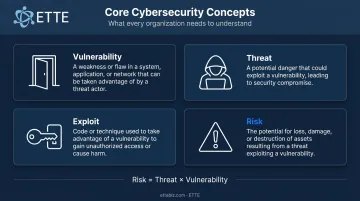
Risk = Threat × Vulnerability. A vulnerability with low exploitation likelihood in an isolated system carries minimal risk. That same flaw in a public-facing donor database carries much higher risk.
What Is a Zero-Day Vulnerability?
A zero-day vulnerability is a flaw unknown to the vendor—or known but not yet patched. "Day Zero" marks the moment a vendor learns of the vulnerability. Until a patch exists, every day that passes increases exposure.
Two systems help the security community track and prioritize these issues:
- CVE (Common Vulnerabilities and Exposures): A standardized catalog of publicly disclosed vulnerabilities, with one record per flaw
- CVSS (Common Vulnerability Scoring System): Scores vulnerabilities from 0.0 to 10.0 based on severity—Critical (9.0–10.0), High (7.0–8.9), Medium (4.0–6.9), and Low (0.1–3.9)
One important note: CVSS measures technical severity, not organizational risk. A Critical-scored vulnerability in a rarely used internal system may matter less than a Medium-scored flaw in your email platform.
Types of Cybersecurity Vulnerabilities
Most real-world breaches don't involve one clean vulnerability type—they combine technical flaws with human failures. Understanding both categories is essential.
Technical Vulnerabilities
The four most common technical vulnerability types for smaller organizations:
Software flaws and unpatched systems — Unaddressed code errors, including SQL injection and cross-site scripting, that attackers can exploit remotely. The 2023 MOVEit Transfer breach illustrates the stakes: CVE-2023-34362, a SQL injection flaw in MOVEit's web application, affected approximately 95.8 million individuals across 2,773 organizations, according to Emsisoft's tracker.
Misconfigurations — Cloud storage left publicly accessible, default credentials never changed, administrator accounts never reviewed. This is a frequent problem in nonprofits, where platforms like Microsoft 365 are assumed to be "secure by default." They're not.
Network weaknesses — Insecure architecture, lack of authentication between systems, or insufficient segmentation that allows an attacker who gains one foothold to move freely.
Outdated hardware and firmware — Devices running unsupported firmware can't receive security patches, leaving permanent gaps.
Organizational gaps — No audit trails, absent incident response plans, and unclear ownership of security responsibilities create exposure even when technical defenses look solid on paper.
Human-Centric Vulnerabilities
People remain the most exploited vulnerability in any organization. The 2024 Verizon Data Breach Investigations Report found that a non-malicious human element was involved in 68% of confirmed breaches.
The primary human-centric risks:
- Social engineering — Phishing emails, pretexting calls, and impersonation attacks that trick staff into handing over credentials or authorizing transfers
- Weak or reused passwords — A single compromised password across multiple accounts can cascade across every system that shares it
- Insufficient security awareness — Staff who can't recognize a phishing attempt are a permanent vulnerability
Over-permissioned accounts deserve special attention. When employees have access to more systems than their role requires, one compromised account can cause widespread damage. The countermeasure is the principle of least privilege: every user gets access to exactly what they need—nothing more.
For nonprofits and associations, high staff turnover, volunteers, and limited training budgets make these risks especially hard to manage. Common patterns that create exposure include:
- Former employees with still-active accounts
- Volunteers using personal devices on organizational systems
- Shared logins used across departments
Each one is an open door.
Why Small Organizations and Nonprofits Face Higher Risk
There's a persistent misconception that small organizations are too small to be targeted. Attackers see it differently. Smaller organizations typically hold valuable data—donor records, member information, financial details—while maintaining weaker defenses. That profile makes them easier targets, not invisible ones.
The structural factors that widen exposure:
- Limited or no dedicated IT staff — Security reviews, patch schedules, and access audits slip when one person is juggling daily support alongside strategic security work
- Aging software and hardware — Tight budgets extend device and software lifecycles beyond their supported periods
- Assumption that security is "someone else's problem" — Without clear ownership, nothing gets done consistently
- BYOD arrangements without standards — Staff using personal devices creates inconsistent security postures across the team
Each of these gaps raises the odds of a successful attack — and for mission-driven organizations, the fallout goes well beyond the immediate financial hit. A compromised donor database carries breach notification costs, but the deeper damage is harder to recover from. Eroded donor trust, compliance violations under state privacy laws or grant requirements, and disrupted programming can each threaten the organization's ability to operate.
The Vulnerability Lifecycle: From Introduction to Remediation
Understanding how vulnerabilities move through their lifecycle explains why timing matters so much.
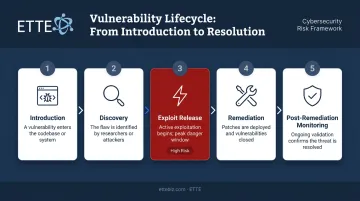
Five stages:
- Introduction — A weakness enters the environment during development, deployment, or configuration
- Discovery — The flaw is identified by a researcher, vendor, or attacker
- Exploit Release — An active exploit becomes available, often before organizations have patched
- Remediation — A fix (patch or workaround) is applied
- Post-Remediation Monitoring — The fix is verified and residual exposure is monitored
The Window of Vulnerability
The gap between when a flaw is introduced and when it's patched is called the window of vulnerability. According to the 2024 Verizon DBIR, the gap plays out like this:
- Attackers exploit newly published CVEs in a median of just 5 days
- Organizations take roughly 55 days to remediate 50% of critical vulnerabilities after patches become available
- About 8% of CISA Known Exploited Vulnerabilities remained open after a full year
For organizations without a structured patch management routine, this window can stretch to months or years.
Authenticated vs. Unauthenticated Scanning
When assessing vulnerabilities, two scanning approaches serve different purposes:
- Authenticated scans — Access internal systems with credentials, producing deeper and more accurate results
- Unauthenticated scans — Simulate what an external attacker can see from the outside
Running both regularly gives your team a realistic picture of exposure — from the inside out and the outside in.
Vulnerability Management: A Step-by-Step Approach
Vulnerability management is a continuous cycle, not a one-time project. Four core steps keep it functional:
1. Identification
Finding vulnerabilities requires active effort:
- Vulnerability scanning tools: Check systems against known CVEs on a regular cadence
- Penetration testing: Simulated attacks that find exploitable weaknesses before real attackers do
- Periodic security reviews: Manual assessments of configurations, access controls, and policies
For organizations without in-house IT, working with a managed security provider ensures identification happens consistently rather than only when something breaks.
2. Assessment and Prioritization
Not every vulnerability deserves equal urgency. CVSS scores provide a starting point, but business context determines priority. A Critical-scored flaw in a rarely accessed internal test system may rank below a Medium-scored flaw in your email platform or donor database.
ETTE's virtual CIO and virtual CISO services approach prioritization this way—evaluating risk in terms of operational impact and mission continuity, not just technical severity scores.
3. Remediation
Three paths exist once a vulnerability is identified:
- Apply the vendor-issued patch when available (the preferred approach)
- Fix misconfigurations that created the exposure in the first place
- Use compensating controls—network segmentation, enhanced monitoring—when immediate patching isn't feasible
Remediation isn't complete until it's verified. A patch applied but not confirmed is an assumption, not a control.
4. Continuous Monitoring
The threat landscape shifts constantly. New vulnerabilities emerge, previously patched issues can resurface after system changes, and attacker techniques evolve. Ongoing monitoring through endpoint detection and log review ensures new exposures are caught quickly.
ETTE GuardRail provides security posture scoring and board-ready reporting that gives nonprofit and association leadership a clear picture of their organization's exposure—without requiring anyone to parse a technical report.
Quarterly service reviews translate security status into the budget and operational terms leadership can act on.
Best Practices to Reduce Your Organization's Cybersecurity Risk
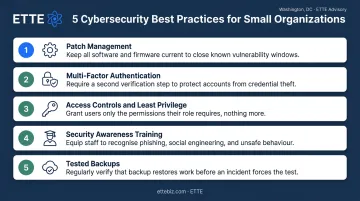
Five foundational practices that work regardless of budget or technical sophistication:
Patch management — Automate software updates wherever possible. ETTE includes scheduled patching across operating systems and common business applications as a baseline service, not an optional add-on. The stat worth remembering: ETTE's internal guidance notes that more than 90% of cyberattacks exploit known vulnerabilities that current patches would have addressed.
Multi-factor authentication (MFA) — Enforce on all critical accounts, especially email and financial systems. CISA states that MFA makes accounts 99% less likely to be compromised.
Access controls and least privilege — Audit user permissions regularly. Remove access that's no longer needed. Pay particular attention after staff transitions or grant-cycle hiring surges.
Security awareness training — Every staff member—including volunteers—needs to recognize phishing and practice password hygiene. Training alone isn't sufficient, but without it, technical controls alone can't close the gap.
Tested backups — Maintain offline backups and verify they can actually be restored. A backup that's never been tested is an assumption, not a recovery plan.
For nonprofits and small businesses without dedicated IT staff, partnering with a managed IT provider that integrates security into daily operations is one of the most effective risk-reduction steps available.
ETTE's layered protection model—covering endpoint security, email filtering, cloud identity, and access management—is built specifically for mission-driven organizations that need security managed predictably, without surprises.
Even the strongest technical stack depends on the people using it. Organizations that set clear security expectations, run brief regular training sessions, and make it easy for staff to report suspicious activity are far harder to breach than those relying on tools alone.
Frequently Asked Questions
What are the main types of cybersecurity vulnerabilities?
Vulnerabilities fall into two broad categories: technical (software flaws, misconfigurations, network weaknesses, outdated hardware) and human-centric (phishing susceptibility, weak passwords, insufficient training). Most real-world breaches involve a combination of both.
What is the difference between a vulnerability and a risk in cybersecurity?
A vulnerability is the weakness itself. Risk is the probability and potential impact of that weakness being exploited. Not every vulnerability is high risk—a flaw in an isolated, low-value system carries far less risk than the same flaw in a public-facing donor platform.
What is a zero-day vulnerability?
A zero-day is a flaw unknown to the vendor, meaning no official patch exists yet. These are especially dangerous: defenders have no fix to apply, so organizations must rely on compensating controls and monitoring until a patch becomes available.
What is vulnerability management?
Vulnerability management is the ongoing process of identifying, assessing, remediating, and monitoring security weaknesses across an organization's systems. It must be continuous because threat landscapes shift constantly, and a one-time assessment becomes outdated quickly.
What is the most common cause of cybersecurity vulnerabilities in small organizations?
Unpatched software, weak or reused passwords, and insufficient security awareness training are the leading causes. Limited IT resources allow these issues to go unaddressed for months, widening the window of exploitation.
How can a nonprofit or small business start addressing cybersecurity vulnerabilities?
Start with a baseline security assessment: document all systems, devices, and who has access to what. Prioritize high-impact fixes like MFA and patch management first. If in-house expertise is limited, a managed IT partner like ETTE can handle ongoing vulnerability monitoring and remediation without requiring dedicated internal security staff.