Introduction
Picture this: a new development associate joins your nonprofit on a Monday. By Wednesday, she still can't access email, has no login for the donor database, and is sharing a colleague's Google Drive credentials just to review a grant document. Her first week is spent waiting — not contributing.
This is a provisioning problem. And it's far more common in nonprofits, associations, and small businesses than most leadership teams realize.
According to Verizon's 2026 Data Breach Investigations Report, the human element appeared in 62% of breaches — and stolen credentials in 28%. Poor access management drives both numbers.
This guide explains what a provisioning system is, how the process works, and what nonprofits, associations, and small businesses can do right now to close the most common gaps — without an enterprise IT team.
Key Takeaways
- A provisioning system controls how IT access is granted, updated, and removed
- Deprovisioning (revoking access) is just as critical as granting it — and more often missed
- Poor provisioning creates orphaned accounts, over-privileged users, and compliance gaps
- Small organizations can start with role definitions and HR-triggered access workflows
- Automation helps, but governance must come first
What Is a Provisioning System?
A provisioning system is the process and technology used to give people and devices the right IT resources, update that access when roles change, and remove it when it's no longer needed. NIST's identity and access management framework frames this as ensuring the right people have the right access to the right resources at the right time.
When someone joins your organization, provisioning determines what email account they get, which shared drives they can open, which applications they're licensed for, and what level of access they hold in each.
Provisioning vs. Configuration
These two terms get conflated often, but they mean different things:
- Provisioning makes the resource available — it builds the room
- Configuration customizes it for a specific use — it furnishes the room
Provisioning creates your new hire's Microsoft 365 account. Configuration sets their email signature, default calendar sharing permissions, and Teams notifications. Provisioning has to happen before configuration can mean anything.
Deprovisioning: The Equally Critical Counterpart
Deprovisioning is the revocation of access when someone leaves or changes roles. It's also the most commonly neglected step in the identity lifecycle, and the risks are concrete, not theoretical.
When a staff member departs without a formal offboarding process, their accounts often stay active. Those credentials remain valid. CISA documented a breach where a threat actor authenticated to four services using a former employee's administrator account that had never been disabled.
Why This Is a Leadership Issue, Not Just an IT Issue
Provisioning directly affects three things leadership cares about:
- Security — Active accounts for inactive staff create entry points for breaches
- Compliance — Funders, auditors, and insurers increasingly ask who has access to what, and when
- Productivity — New staff who can't work on day one cost real time and morale
A provisioning system — whether software-driven or a structured manual workflow — is the control layer that connects HR records, identity data, and IT tools so access is granted, updated, and removed consistently.
Types of Provisioning
Most organizations deal with several types of provisioning simultaneously. Here's how each one functions in a lean IT environment.
User Provisioning
User provisioning covers creating and managing employee or contractor accounts across systems — email, shared drives, business applications, and collaboration tools. It's the most common type most IT teams encounter.
For nonprofits and associations, this typically means Microsoft 365 or Google Workspace accounts, plus access to CRM platforms, finance tools, and donor management systems. ETTE manages this as part of its cloud productivity service for Washington, DC nonprofits, covering account creation, license assignment, and access configuration.
User provisioning is almost always triggered by an HR event: a new hire, a role change, or a departure. When that trigger is informal or undocumented, the process breaks down.
Network Provisioning
Network provisioning configures the infrastructure that lets users and devices connect securely — routers, switches, firewalls, VPN access, and Wi-Fi. It includes assigning IP addresses and defining which network segments different users can reach.
In practice, a small organization's network provisioning typically covers:
- Configuring separate guest Wi-Fi isolated from internal systems
- Restricting internal network access to managed devices only
- Requiring remote staff to connect through a secured VPN
Device Provisioning
Device provisioning sets up laptops, smartphones, and tablets with the correct software, security policies, and credentials before they reach a user.
When someone asks "what is provisioning on my phone?" — that's the answer. It means enrolling a device into an organization's management system so security policies, approved apps, and credentials are pushed automatically.
The UK government's 2025/2026 cyber security survey found that only 35% of charities required access through organization-owned devices, compared to 66% of businesses — a significant gap that device provisioning directly addresses.
Cloud and Application Provisioning
Cloud provisioning allocates and configures cloud-based resources — storage, SaaS tools, collaboration platforms — for specific users or teams. Application provisioning ensures staff only receive access to the tools their role actually requires.
Without deliberate role-based provisioning, users accumulate access to tools they no longer use, creating unnecessary exposure. Microsoft's 2024 multicloud telemetry found that only 2% of granted permissions were actively used — a signal of how quickly over-provisioning happens without active governance.
How a Provisioning System Works: The Step-by-Step Process
Provisioning follows a predictable lifecycle. Understanding each step helps organizations identify exactly where their current process breaks down.
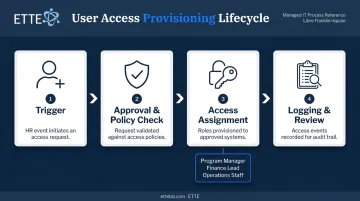
Step 1: Triggering the Request
Provisioning begins with a trigger — typically an HR event. A new hire is added to your HR system, a manager submits an access request, or a staff member changes departments. In automated systems, this trigger flows directly into the provisioning workflow without anyone having to remember to send an email.
In manual environments, that trigger is often someone's memory. That's where delays start.
Step 2: Approval and Policy Check
Before access is granted, a well-designed provisioning system checks whether the request aligns with defined policies. A Finance staff member shouldn't automatically receive access to program files. A program officer doesn't need administrator rights to your email platform.
This step — sometimes called a policy gate — prevents over-provisioning. NIST SP 800-53's AC-2 Account Management controls require organizations to specify privileges and attributes, and approve requests before accounts are created or modified.
Step 3: Access Assignment and Account Creation
Once approved, the provisioning system acts based on predefined rules tied to the user's role or department:
- Creates accounts across relevant platforms
- Assigns group memberships and application licenses
- Sets permissions according to the user's defined role
Role-based access makes this scalable. Instead of configuring access individually for each new hire, you define roles — "Program Manager," "Finance Lead," "Operations Staff" — and assign access packages to each. When someone joins in a given role, they receive exactly what that role requires.
Step 4: Logging, Monitoring, and Review
A complete provisioning system maintains an audit trail for every access event. This record is essential for security reviews, cyber insurance applications, and grant or donor audits. A well-structured trail captures:
- Who requested access and who approved it
- When access was granted and when it was revoked
- Any exceptions or policy overrides along the way
ETTE's GuardRail security posture reporting surfaces this information to client leadership through a dedicated Identity & Access Posture review, covering multi-factor authentication status, privileged account activity, and conditional access controls. This documentation doesn't just protect the organization — it proves protection to external stakeholders who ask.
Periodic access reviews should be built into any provisioning workflow. Even good systems accumulate access over time as staff change responsibilities.
Manual vs. Automated Provisioning: Why It Matters for Small Organizations
The Problems with Manual Provisioning
Manual provisioning means someone — an IT contact, an office manager, a department head — creates accounts one at a time, usually from an email request or a verbal instruction. In organizations with 10-50 staff, this is the norm.
The problems are predictable:
- New staff wait days for access they need on day one
- Different people follow different steps each time, producing inconsistent results
- When someone leaves quickly, the offboarding checklist doesn't always get finished
- There's no record of what was granted, when, or by whom
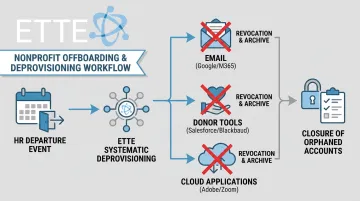
ETTE commonly finds, when inheriting IT environments from nonprofits, that former employees still appear in active systems — cloud platforms, email, donor tools — because no one completed the offboarding steps.
What Automated Provisioning Solves
Those gaps aren't a people problem — they're a process problem. Automation connects HR or directory data to the provisioning platform so that access is granted and revoked based on defined rules, not individual memory. When a departure is recorded in the HR system, accounts are disabled. When a role changes, access adjusts.
Here's a direct comparison:
| Dimension | Manual Provisioning | Automated Provisioning |
|---|---|---|
| Speed | Days (depends on someone acting) | Minutes (triggered by HR event) |
| Accuracy | Varies by person and process | Consistent, rule-based |
| Security risk | High (forgotten steps, orphaned accounts) | Lower (automatic revocation) |
| Audit readiness | Poor (no central record) | Strong (complete log) |
| IT workload | High (repetitive, error-prone) | Lower (exceptions only) |
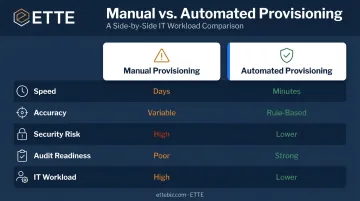
Even small organizations with limited IT capacity benefit from automation — not because it replaces governance, but because it executes governance consistently.
Risks of Poor Provisioning Practices
Over-Provisioning
Over-provisioning happens when users receive more access than their role requires. It's usually a shortcut — "just give them access to everything so they can get started." In small organizations without dedicated IT staff, this shortcut is common.
The result is unnecessary exposure. Staff with access to sensitive donor records, financial data, or confidential client files — access they don't need and may never use — represent an expanded attack surface. If their credentials are compromised, the damage is proportionally larger.
Orphaned Accounts
An orphaned account is an active account belonging to someone who no longer works at the organization. A former contractor, a departed program officer, a volunteer who helped during a campaign — if their accounts weren't disabled during offboarding, those credentials remain valid entry points.
CISA's documented case makes this concrete: a threat actor used a former employee's unrevoked administrator account to access multiple services. The account was never disabled — and the organization didn't know it was still active.
ETTE helps Washington, DC nonprofits establish offboarding workflows that close this gap. When someone leaves, access revocation triggers across all systems — not just the obvious ones.
Compliance Exposure
Poor provisioning creates poor documentation. For nonprofits managing donor data, grant-funded programs, or member information, that gap becomes a liability when auditors ask:
- Who had access to the donor database last year?
- When was that access revoked?
- Were finance systems restricted to authorized staff?
Without a provisioning record, none of those questions have answers. For organizations facing data protection requirements, cyber insurance reviews, or grant compliance audits, that silence can mean failed audits, denied coverage, or grant clawbacks.
Provisioning Best Practices for Small Organizations
Apply the Principle of Least Privilege
Every user should receive only the minimum access their role requires. Role-based access policies make this manageable: define roles, assign access packages to those roles, and let the system handle the rest.
When someone's responsibilities change, access adjusts automatically rather than accumulating on top of what they already had.
Tie Provisioning to HR Workflows
Provisioning should begin and end with official HR events — not IT tickets submitted after the fact or verbal requests from managers.
A new hire triggers account creation. A resignation or contract end triggers deprovisioning. Organizations that treat provisioning as a separate IT task — disconnected from HR — consistently run into the same problems:
- Delayed onboarding because IT wasn't notified in time
- Forgotten offboarding that leaves active accounts after a departure
- Orphaned accounts persisting for months with no owner
Conduct Periodic Access Reviews
Even with solid provisioning workflows, access creep happens. Staff take on new responsibilities and accumulate tool access over time. They rarely give back permissions they no longer need.
CIS Control 5 recommends a quarterly account inventory as part of essential cyber hygiene for any organization. For nonprofits and associations managing sensitive donor or member data, scheduled reviews — where managers confirm whether their team still needs the access they have — are a foundational security practice.
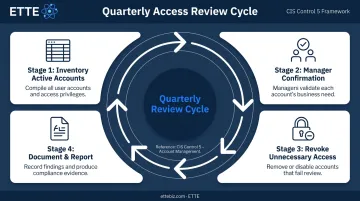
ETTE structures access reviews as a standard component of its managed IT program for Washington, DC nonprofits and associations, with findings surfaced through GuardRail security posture reporting and quarterly service reviews. The result is a documented, auditable access record that holds up to scrutiny — whether during an internal review or an external audit.
Frequently Asked Questions
What is a provisioning system?
A provisioning system is the software or structured process that manages how IT resources — accounts, devices, network access, and applications — are assigned to users, updated as roles change, and removed when access is no longer needed. It acts as the control layer connecting HR data, identity records, and IT tools.
What does provisioning mean for Wi-Fi?
Wi-Fi provisioning is the process of configuring a wireless network to allow authorized users or devices to connect. This includes setting up access credentials, security protocols, and network policies that determine who can join and what they can reach once connected.
What is provisioning on my phone?
Phone provisioning means enrolling a mobile device into your organization's management system. That system then pushes security policies, approved applications, and credentials directly to the device — making it ready for safe use without manual configuration.
What is the difference between provisioning and deprovisioning?
Provisioning grants access; deprovisioning revokes it. Both are equally important parts of the identity lifecycle. Deprovisioning failure — leaving accounts active after someone leaves — is one of the most common and exploitable security gaps in small organizations.
How does automated provisioning improve security?
Automation reduces human error, enforces consistent access policies, ensures deprovisioning happens immediately when someone leaves, and creates a complete audit trail. Together, these controls close the gaps that manual processes — however well-intentioned — routinely leave open.