Introduction
Most security failures aren't sophisticated. They trace back to something simpler: the wrong person had access to something they shouldn't have.
CISA documented exactly this scenario when a threat actor authenticated into a state government's VPN using compromised credentials from a former network administrator's account — an account that should have been deactivated. The attacker collected host and user information and listed it for sale. No zero-day exploit required.
According to Verizon's 2025 Data Breach Investigations Report, stolen credentials were the primary hacking method in 33% of SMB breaches. That's not a technology gap — it's an access management gap.
This guide explains how user access control actually works: the underlying logic, the models organizations use, where it applies in practice, and what strong access management looks like for a small organization. It also covers Windows UAC specifically, since the acronym means two different things.
Key Takeaways
- User access control governs who can access which systems and what they're permitted to do once inside
- Windows UAC is a separate, built-in feature that limits application privileges on individual machines
- Access control operates through authentication (verifying identity) then authorization (assigning permissions)
- RBAC, MAC, DAC, and ABAC are the four core models — most small organizations start with RBAC
- Least privilege, MFA, and regular access reviews consistently reduce risk more than any other controls
What Is User Access Control?
User access control is a security methodology that determines who is allowed into specific systems, data, or resources — and what they can do once inside. It covers both identity verification and permission management as connected disciplines, not separate ones.
Without structured access controls, any user with valid credentials could reach any resource. Any application could run with full system privileges. That's the gap access control exists to close.
Two Things Share the Same Acronym
The term "UAC" refers to two distinct concepts:
- Organizational access control — governs who can access what across every person, system, dataset, and application throughout their lifecycle; it's an enterprise-wide discipline, not a single tool
- Windows UAC — a built-in Windows feature (introduced in Vista) that blocks applications from running with admin privileges by default, prompting users to confirm before any system-level change executes
They share the same principle — least privilege — but operate at entirely different levels. Windows UAC governs local process privileges on a single machine. Organizational access control covers every system, account, and identity across the entire environment. That distinction matters when scoping where a gap actually lives.
Why It Still Matters
Remote work, contractor relationships, SaaS sprawl, and employee turnover create constant access management challenges. A 2025 CSA survey of 420 IT and security professionals found widespread gaps at the organizational level:
- 58% struggled to enforce privileges consistently
- 54% lacked identity-lifecycle automation
For nonprofits and associations with high staff turnover, these gaps compound quickly.
Access Control Models: The Four Main Approaches
Organizations implement access control through structured frameworks. NIST's Guide to Attribute Based Access Control defines the four most common:
| Model | How It Works | Best For |
|---|---|---|
| RBAC (Role-Based) | Permissions assigned to roles; users inherit permissions through role membership | Small organizations, clear job functions |
| MAC (Mandatory) | Centrally controlled policy using clearance levels and object labels; users can't alter policy | Regulated environments, government |
| DAC (Discretionary) | Resource owners determine who can access their objects | Collaborative environments, file sharing |
| ABAC (Attribute-Based) | Dynamic decisions based on subject, object, and environmental attributes (location, time, device) | Complex or remote-work environments |
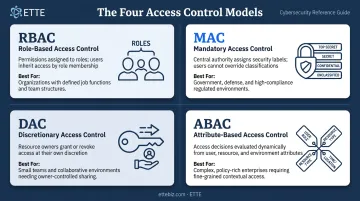
Most small organizations start with RBAC because it's straightforward to implement and easy to explain to staff. As environments grow more dynamic — more contractors, more cloud tools, more remote workers — ABAC attributes fill the gaps RBAC alone can't cover.
The right model depends on your data sensitivity and how often access conditions change — which is why understanding each framework matters before choosing one.
How Does User Access Control Work?
Access control follows a defined sequence: a request triggers verification, permission evaluation, enforcement, and logging. Each stage adds a layer of protection.
Step 1: Authentication — Confirming Identity
The process begins when a user or application requests access. Before anything else, the system verifies who's asking — through a password, MFA, biometrics, or security token.
In Windows environments, successful login generates an access token that records the user's identity, group memberships, privileges, and logon session. For administrator accounts, UAC creates two tokens: a filtered standard-user token used by default, and a full administrator token held in reserve until explicitly needed.
Microsoft's 2025 Digital Defense Report found MFA blocks 99% of unauthorized access attempts — making it the single highest-ROI control most organizations can implement.
Step 2: Authorization — Assigning Permissions
Once identity is confirmed, authorization determines what that identity can do: read, edit, delete, install, or execute. Permissions are evaluated against an access control list (ACL) or role/attribute policy that defines allowable actions per resource.
The governing logic here is least privilege: users, applications, and systems receive only the minimum permissions needed for their function. Nothing more. This limits the blast radius when an account is compromised — and in most environments, compromise is a matter of when, not if.
For Windows UAC specifically: when an application requires elevated privileges beyond the standard token, UAC triggers an elevation prompt on a secure desktop. Administrators see a consent prompt; standard users see a credential prompt requiring administrator credentials. The secure desktop prevents spoofing by allowing only Windows processes to interact with it.
Step 3: Enforcement — Controlling Active Sessions
Access control doesn't stop at the login screen. Enforcement continues throughout each session using integrity levels — low, medium, high, and system.
Standard users run at medium integrity. Elevated users run at high. A mandatory "no write up" rule prevents lower-integrity processes from modifying higher-integrity objects. A web browser, for example, runs at low integrity — so even if compromised, it cannot easily modify system files.
Dynamic access models revoke or modify access in real time when conditions change. Logging in from an unrecognized device, accessing systems outside business hours, or triggering anomalous behavior can prompt additional verification or outright denial — no human intervention required.
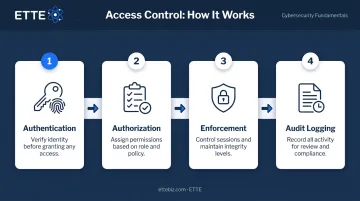
Step 4: Audit Logs — The Operational Record
Every access event produces a record: who accessed what, when, from where, and whether access was granted or denied. NIST identifies the core log events organizations should capture:
Every access event produces a record: who accessed what, when, from where, and whether access was granted or denied. NIST identifies the core log events organizations should capture:
- Authentication successes and failures
- File access attempts
- Policy changes
- Account creation and deletion
- Administrative privilege use
These logs aren't just documentation — they're the foundation for incident detection, breach investigation, event reconstruction, and regulatory compliance. Without complete, tamper-resistant logs, you cannot answer the most basic post-incident question: what did the attacker actually touch?
Where User Access Control Applies in Your Organization
Access control decisions occur at predictable operational moments. The most important ones:
- Onboarding — granting appropriate initial access based on role, before day one
- Role changes — adjusting permissions when someone changes positions (not leaving old access in place)
- Contractor and vendor access — scoped, time-limited credentials rather than broad organizational access
- Offboarding — revoking access immediately upon departure, not days or weeks later
The environments where this matters most for small organizations:
- Financial systems and accounting platforms
- HR records and personnel files
- Donor databases and CRM systems
- Grant management platforms
- Cloud storage with sensitive documents
- Email and calendar (frequently overlooked)
For nonprofits and associations, these systems often carry compliance obligations:
- HIPAA — requires audit controls and regular review of system activity records (45 CFR 164.312(b))
- GDPR Article 25 — requires data protection by design and limits access to what's necessary for the stated purpose
- Grant requirements — most funders expect documented access controls for data touching their funds
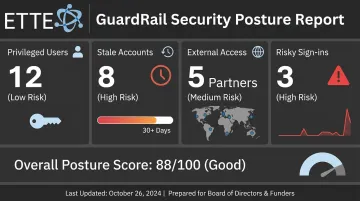
ETTE works with Washington, DC nonprofits and associations to establish structured access controls as part of managed IT engagements — documenting environments, conducting access reviews, and delivering leadership visibility through ETTE GuardRail.
The GuardRail security posture report tracks privileged users, external access, stale accounts, and risky sign-ins on a recurring cadence, producing plain-language reporting that works for board packs and funder questionnaires.
Best Practices to Strengthen User Access Control
Start With These Three
Least privilege — Audit every account and remove permissions that aren't actively needed. This applies to users and to applications. Over-permissioned accounts are the norm in organizations that haven't done a deliberate review; correcting this reduces risk immediately without any new tools.
MFA as a baseline — Treat it as mandatory. MFA blocks 99% of unauthorized access attempts — making it the most cost-effective control available. Prioritize administrator accounts and any system with access to financial or sensitive data.
Regular access reviews — Quarterly is the right cadence for most small organizations. Reviews should cover who has access to critical systems, whether that access matches current roles, and which accounts should be deprovisioned. This is where most organizations find their biggest gaps.
Automate Provisioning and Deprovisioning
Manual processes introduce delays and errors. A single missed offboarding step can leave an open door for months. The CISA case mentioned in the introduction is a real consequence of exactly that failure.
Identity and access management (IAM) tools automate joiner/mover/leaver workflows across three critical moments:
- New hires get appropriate access on day one, without manual ticket requests
- Role changes trigger permission updates automatically as staff move between teams
- Departures immediately revoke credentials across all connected systems
Without automation, access changes depend on someone remembering to act — and that memory fails.
Apply Zero Trust as an Operating Principle
Zero Trust, as defined by NIST SP 800-207, grants no implicit trust based on network location or device ownership. Every access request requires authentication and authorization before access is granted, even from inside the network perimeter.
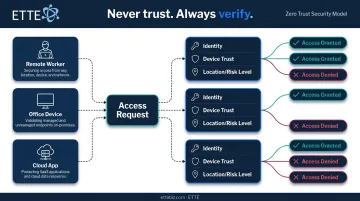
This matters particularly for organizations that previously relied on physical office presence as a proxy for trust. Remote work and cloud-based tools have made that assumption dangerous. Conditional access policies that evaluate device type, location, and risk level before permitting login are the practical implementation of this principle.
Conclusion
User access control is an ongoing discipline, not a setup task. It requires consistent enforcement, regular reviews, and clear visibility into who has access to what — and whether that access is still appropriate.
The organizations that treat this as a living practice — with documented environments, quarterly reviews, and automated provisioning workflows — avoid the most common and costly failures. The ones that don't tend to discover their gaps during incident response, which is the worst possible time.
That operational foundation has a direct payoff at the leadership level. When leaders understand the authentication-authorization-enforcement-audit chain, they can ask sharper questions of their IT partners, hold vendors accountable, and speak to security posture in front of boards, donors, and regulators — without relying on someone else to translate.
Frequently Asked Questions
What is user access control?
User access control is a security methodology that governs who can access systems, data, or resources within an organization and what actions they're permitted to take. It encompasses both identity verification (authentication) and permission enforcement (authorization) as two required steps.
Is it safe to disable Windows User Account Control (UAC)?
No. Disabling Windows UAC removes the prompt that blocks unauthorized or accidental system-level changes, which exposes the system to malware and privilege escalation attacks. Microsoft considers UAC a baseline security requirement, not an optional feature.
What is the difference between authentication and authorization?
Authentication confirms who a user is — through a password, MFA, or biometrics. Authorization determines what that verified user is permitted to do. Both steps are required: verifying identity without controlling permissions (or vice versa) leaves meaningful gaps.
What is the principle of least privilege, and why does it matter?
Least privilege means giving users only the minimum access required to do their job, nothing beyond that. It matters because over-permissioned accounts dramatically expand the potential damage from compromised credentials, insider misuse, or accidental errors.
What happens if access isn't revoked when an employee leaves?
Unrevoked access creates active risk. Former employees, or anyone who obtains their credentials, can still authenticate into systems and access sensitive data. This is one of the most common and most preventable access control failures in small organizations.
How does user access control support regulatory compliance?
HIPAA requires audit controls and periodic access reviews; GDPR requires access limited to what's necessary for the stated purpose. Proper access controls, paired with audit logs and documented reviews, provide both the enforcement mechanism and the evidence regulators expect to see.